Q1: What Does ‘AI SOC Integration’ Actually Mean, And Where Does It Sit in Your Existing SOC Architecture?
Here’s the operational reality: most security teams are running CrowdStrike for endpoints, Splunk or Sentinel for logs, Okta for identity, and at least one cloud console, whether AWS, Azure, or GCP. Each tool generates its own alerts, its own dashboards, and its own investigation workflows. The result is what I call the “paralysis of fragmentation.” Alerts are everywhere, but understanding is nowhere. Your analysts toggle between four or five consoles at 2 AM, manually correlating what should be connected automatically. AI SOC integration is the architectural answer to this mess, a layer that sits above your existing SIEM, EDR, cloud, and identity tools, ingesting telemetry from all of them, correlating through AI, and delivering unified detection and response without forcing you to rip and replace a single tool you already own.
The Architecture in Plain Terms
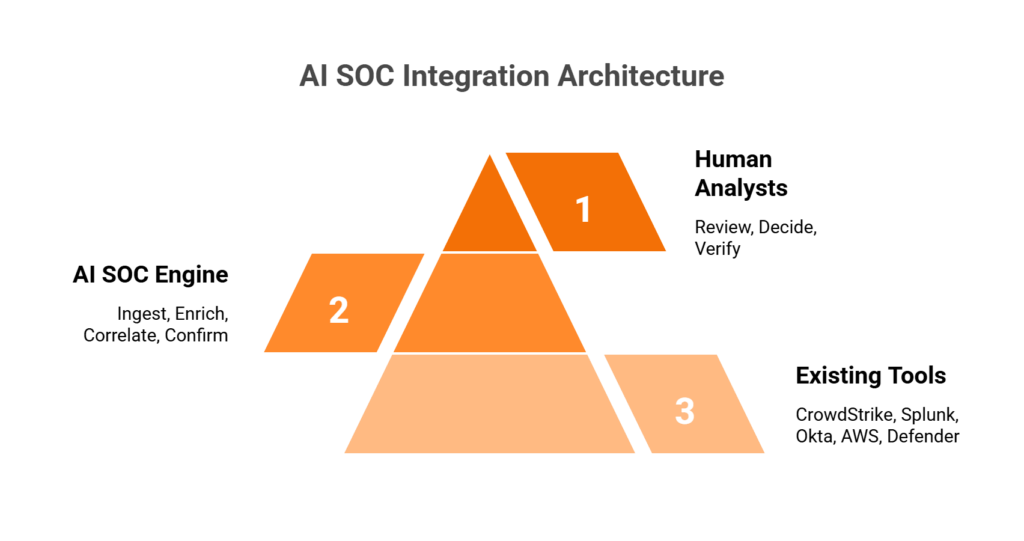
Think of it as a three-tier stack:
- Bottom layer: Your existing tools, such as CrowdStrike, Splunk, Okta, AWS GuardDuty, and Microsoft Defender. These keep doing what they do. They generate telemetry and alerts.
- Middle layer: The AI SOC engine ingests alerts and raw logs via native APIs, enriches with threat intelligence, correlates across data sources, and surfaces only confirmed or high-confidence incidents.
- Top layer: Human analysts review AI-produced investigation summaries, make judgment calls on edge cases, and communicate directly with affected users to verify suspicious activity.
This is not a theoretical diagram. It’s how operational security should work when your tools actually talk to each other.
❌ The “Rip-and-Replace” and “Alert Factory” Traps
Traditional approaches break down in two predictable ways. Arctic Wolf forces proprietary SIEM replacement, meaning you abandon the correlation rules, business logic, and automation you’ve spent years tuning just to get their monitoring service. As one G2 reviewer described it:
“We received little value from ArcticWolf. The product offered little visibility when we were using it… Anything you want to look at or changes you need to make in the product must go through their engineering team.”
— Matt C., Manager, Cybersecurity Services Arctic Wolf – G2 Verified Review
On the other end, legacy MSSPs provide monitoring without intelligence: checkbox coverage built on rigid playbooks rather than real-time threat context. And providers like ReliaQuest over-rely on AI, returning tickets without actionable context that still require your team to investigate. These approaches either destroy existing investments or generate alert volume without resolution.
✅ Integration as the Competitive Advantage
The advantage in 2026 is not having security tools. It’s having a system that can reason across them. Detection without response is noise. Response without context is risk. The “AI SOC + Human Ally” model represents the architectural shift: a system that ingests from SIEM, EDR, cloud, and identity, correlates through AI-driven enrichment, and delivers confirmed-threat response with human verification. It automates the investigation grunt work, including querying SIEM, pulling logs, and enriching with threat intel, while humans handle the edge cases that require business judgment.
How We Built This at UnderDefense
We designed UnderDefense MAXI specifically around this principle: layer in, don’t take over. That means 250+ integrations with your existing tools, deployment in your own cloud environment (AWS, Azure, GCP, or Oracle), and ChatOps user verification via Slack, Teams, or email so our analysts can confirm suspicious activity directly with affected users. The core message is simple: we keep your existing stack and the security tools you own. All your business logic, correlation rules, and compliance audit trails stay exactly where they are.
⏰ The Proof
2-minute alert-to-triage, 15-minute escalation for critical incidents, and zero ransomware cases across all MDR customers for 6 years, because integration without response capability is just expensive alerting.
Q2: How Does an AI SOC Connect to Your SIEM, Specifically Splunk, Microsoft Sentinel, Elastic, and QRadar?
The core principle is straightforward: AI SOC sits on top of your SIEM, not beside it and definitely not instead of it. It ingests alerts and raw logs via native API connectors, syslog forwarding, or data lake queries. It then enriches them with threat intelligence, correlates across multiple data sources, and triages before returning confirmed incidents back to your SIEM console. Your SIEM remains the log repository and compliance audit trail. The AI SOC becomes the investigation and response engine.
Why This Matters Operationally
This architecture preserves something most MDR providers ignore: SIEM data ownership. As one CISO put it during a recent conversation, when you let an MDR vendor bring their own SIEM, all your business logic, including correlation rules, custom integrations, and automation playbooks, lives in their system. If you switch providers, you start over from scratch. That’s a lesson too many security leaders learn the hard way.
Platform-Specific Integration Breakdown
| SIEM Platform | Ingestion Method | Bidirectional Flow | Key Capability |
|---|---|---|---|
| Splunk | REST API + HTTP Event Collector (HEC) | AI SOC queries SPL, pushes enriched findings back | Full index-level access for deep log analysis |
| Microsoft Sentinel | Microsoft Graph Security API + Azure Event Hubs | Bidirectional alert and incident sync | Native Azure ecosystem correlation |
| Elastic | Elasticsearch API for direct index queries | Kibana alert forwarding + enrichment return | Detection-as-code compatibility with Elastic rules |
| QRadar | QRadar Offense API + syslog forwarding | Offense enrichment and priority adjustment | Legacy environment support with modern AI overlay |
Each integration follows the same principle: read alerts and logs from your SIEM, enrich and correlate through AI, and return only confirmed or high-confidence incidents for analyst review.
✅ What Changes in Your SIEM Workflow
The SIEM still collects and stores every log. That doesn’t change. What changes is what happens after collection:
- Before AI SOC: Tier 1 analysts manually triage alerts, spending 10 to 15 hours per week investigating noise, toggling between consoles, and chasing false positives.
- After AI SOC: The AI layer auto-enriches every alert with threat intelligence, user context, and cross-tool correlation, surfacing only confirmed or high-confidence incidents. SIEM = data backbone. AI SOC = analytical brain.
The detection-as-code approach matters here, too. Security rules should be versioned, unit-tested, and deployed via CI/CD, not static signatures that decay over time. When a rule triggers a false positive, you update it in version control, test it against historical data, and deploy the fix across your environment. This is how modern detection engineering works.
How UnderDefense Simplifies This
UnderDefense MAXI works with your existing SIEM, whether Splunk, Sentinel, Chronicle, or Elastic, preserving log ownership and your compliance audit trail. Our detection-as-code approach means security rules are versioned, unit-tested, and deployed through CI/CD pipelines. We log into your system, exactly as one experienced CISO recommended: “I want to control where that data lives… I look for an MDR partner that will access the data where it lives.”
“UnderDefense MAXI integrates well with our systems, specifically with our SIEM, Splunk. Their team is proactive in identifying and addressing threats, providing 24/7 oversight.”
— Oleg K., Director Information Security UnderDefense – G2 Verified Review
Q3: How Does an AI SOC Layer Into Your EDR/XDR, Including CrowdStrike Falcon, Microsoft Defender, and SentinelOne?
The integration model between AI SOC and EDR/XDR is API-driven and bidirectional: pull endpoint telemetry in (process executions, file modifications, network connections, and behavioral detections) and push response actions out (isolate host, kill process, and revoke credentials). The critical addition is cross-environment correlation that standalone EDR simply cannot deliver, linking an endpoint alert to identity behavior in Okta, cloud activity in AWS, and email compromise signals in Microsoft 365, all within a single investigation view.
Platform-Specific EDR Integration
| EDR/XDR Platform | API for Telemetry Ingestion | Response Actions Available | Human-in-the-Loop Gate |
|---|---|---|---|
| CrowdStrike Falcon | Falcon API (detection + prevention APIs) | Real Time Response: host isolation, process kill, credential revocation | Analyst approval for critical containment |
| Microsoft Defender for Endpoint | M365 Defender API + Microsoft Graph Security API | Automated isolation, investigation packages, remediation actions | Approval gates on cross-tenant actions |
| SentinelOne | REST API for threat ingestion | Automated isolation, threat rollback, network quarantine | Analyst confirmation before rollback |
Each platform follows the same pattern: AI SOC ingests the endpoint telemetry, enriches it with context from other sources (SIEM logs, identity events, and cloud activity), and presents the analyst with a correlated investigation summary rather than a raw alert.
⚠️ What Changes in Your EDR Workflow
Here’s the practical difference. Without AI SOC integration, your workflow looks like this: CrowdStrike flags suspicious PowerShell execution → analyst opens Falcon console → manually checks Splunk for related network activity → switches to Okta to verify user identity → spends 45 minutes before determining it was a developer running a legitimate script.
With AI SOC integration: CrowdStrike flags the same alert → AI SOC auto-correlates with Okta session data, Splunk network logs, and recent change tickets → analyst reaches out to the user via Slack to verify → confirmed false positive in under 3 minutes. Or, if the activity is malicious, containment (endpoint isolation + credential revocation) happens before the analyst’s investigation summary even lands in the queue.
Why EDR Alone Falls Short
The gap is not in EDR detection quality. CrowdStrike, SentinelOne, and Defender are all strong products. The gap is organizational context. EDR sees what happened on the endpoint. It doesn’t know why your VP of Engineering runs unusual scripts on weekends before product launches, or that the “suspicious login” from an unusual country is actually your sales director traveling. That context requires either human verification or a system that can ask the user directly.
How UnderDefense Closes This Gap
We don’t replace your CrowdStrike. We make it operationally effective. UnderDefense MAXI integrates with your existing EDR deployment, adds cross-environment correlation that pure endpoint technology misses, and provides the concierge analyst layer that verifies suspicious activity directly with affected users via ChatOps. Documented case studies show UnderDefense detected and contained threats 2 days faster than CrowdStrike OverWatch, because organizational context and direct user verification close gaps that endpoint-only analysis cannot.
“Their expert management of our SIEM has added to the value of our security investments and tools… UnderDefense has changed our approach to cybersecurity.”
— Yaroslava K., IT Project Manager UnderDefense – G2 Verified Review
“The seamless integration and optimization of the EDR platform, CrowdStrike, has been impressive. Despite the complexity involved, they delivered the deployment to 1200+ endpoints in just 23 business days.”
— Oleksii M., Mid-Market UnderDefense – G2 Verified Review
Q4: How Does AI SOC Integrate With Cloud Platforms, Specifically AWS, Azure, and GCP?
Cloud environments are where most AI SOC integration falls apart, and it’s the biggest content gap among competitors for a reason. Cloud telemetry doesn’t look like on-prem telemetry. Logs are API-based, alert formats are service-specific, threats are IAM-centric, and the shared responsibility model means your cloud provider is not handling detection and response for what you deploy. The AI SOC must ingest from cloud-native security services and correlate with on-prem SIEM/EDR data for unified hybrid visibility.
☁️ AWS Integration
AWS is the most common cloud platform we encounter, and the integration covers five primary telemetry sources:
- CloudTrail for API activity logging (who did what, when, and from where)
- GuardDuty for threat findings (reconnaissance, credential compromise, and crypto-mining)
- Security Hub for aggregated findings from multiple AWS security services
- VPC Flow Logs for network traffic metadata used in lateral movement detection
- IAM Access Analyzer for overly permissive policies and external access paths
Response actions include IAM policy revocation, Security Group modifications, and EC2 instance isolation, all executed via AWS APIs with analyst approval gates. In a live demo we’ve run publicly, we showed how an attacker could steal credentials from an EC2 instance metadata service via a basic SSRF vulnerability and escalate to admin access, and how UnderDefense MAXI detected the unusual behavior and created an incident before AWS’s native alerting caught up.
☁️ Azure Integration
- Microsoft Sentinel (if deployed) for bidirectional alert and incident sync
- Defender for Cloud for cloud security posture management findings
- Entra ID for sign-in logs, audit logs, and conditional access events
- Azure Activity Logs for resource-level operations
Response capabilities include Entra ID conditional access enforcement, resource isolation, account lockout, and Security Group policy adjustments.
☁️ GCP Integration
- Security Command Center for centralized security findings
- Cloud Audit Logs for admin activity and data access
- VPC Flow Logs for network traffic analysis
- Chronicle (if deployed) for native SIEM integration
Response via GCP IAM and resource management APIs for permission revocation and workload isolation.
💰 Why Cloud Detection Requires a Specialist Approach
As we’ve seen firsthand across hundreds of customer environments, the biggest misconception is that moving to the cloud shifts risk. It doesn’t shift risk; it changes the risk. Your internal IT team understands VMware and on-prem servers. They may not understand how IAM roles chain together in AWS, or how a misconfigured S3 bucket exposes 123 million records. Cloud Detection & Response is a specialty, not a hobby.
How UnderDefense Handles Cloud
UnderDefense MAXI operates in customer cloud environments, including AWS, Azure, GCP, and Oracle, keeping logs and AI data in your data lake. Cloud Detection & Response covers Kubernetes security, misconfigurations, and DevOps vulnerabilities. We don’t just monitor cloud alerts. We contain threats targeting your cloud infrastructure, with response actions that include IAM revocation, resource isolation, and infrastructure-as-code validation.
“Having navigated numerous cloud configurations and server environments over the years, I genuinely appreciate how UnderDefense MAXI seamlessly integrates MDR with AWS. It’s not just about adding another layer; it feels as if they’ve crafted a custom-fit armor for my infrastructure.”
— Lesia P., Product Marketing Manager UnderDefense – G2 Verified Review
“They know everything about cloud security. UnderDefense protects all our cloud stuff. If something does happen, they react automatically, which is amazing.”
— Verified User UnderDefense – G2 Verified Review
Q5: What About SOAR, Identity, Email, and Ticketing, the Full AI SOC Compatibility Matrix?
Most conversations about AI SOC integration stop at SIEM, EDR, and cloud, but a real security operations environment runs on a much wider stack. SOAR platforms, identity providers, email security tools, network firewalls, and ITSM ticketing systems all generate signals your SOC needs to see, correlate, and act on. If your AI SOC layer can’t reach into these systems, you’re left with the same blind spots that created the problem in the first place.
SOAR: Complement, Don’t Replace
Here’s where the confusion usually starts. SOAR platforms, such as Palo Alto XSOAR, Splunk SOAR, and Tines, were designed to orchestrate known response actions through predefined playbooks. They execute “if X, then Y” logic extremely well. What they don’t do is reason through unknown alerts, investigate context across tools, or adapt investigation steps to novel threats.
AI SOC absorbs the investigation work that SOAR playbooks were never designed to handle. SOAR orchestrates the downstream action; AI SOC handles upstream triage and enrichment. If you already run a mature SOAR instance, keep it, because your AI SOC feeds it higher-fidelity inputs. If you don’t have SOAR, an AI SOC with built-in response orchestration covers investigation and response without adding another platform to maintain.
Identity, Email, Network, and Ticketing
These integration categories are non-negotiable for cross-functional visibility:
- Identity/IAM: Okta (user lifecycle events, MFA challenges, and suspicious login detection), Azure AD/Entra ID (sign-in logs, conditional access policy triggers), and Duo (authentication events). As one CISO put it in a podcast discussion, “use that third-party IDP if it’s a good one, with MFA, but make sure those logs and that audit trail” are going to your security operations center.
- Email Security: Microsoft 365 Defender for Office (phishing, BEC signals) and Google Workspace (OAuth grants, forwarding rule changes). Email remains the primary initial access vector, and these signals need to be correlated with endpoint and identity data, not siloed.
- Network/Firewall: Palo Alto, Fortinet, and Cisco firewall logs, plus IDS/IPS alerts. Network telemetry fills gaps that endpoint agents can’t cover, especially in east-west lateral movement detection.
- ITSM/Ticketing: ServiceNow and Jira, with bidirectional ticket creation and status sync. Without this, your SOC analysts are copy-pasting between consoles at 2 AM.
🔍 Master AI SOC Compatibility Matrix
| Tool Category | Specific Tool | Integration Method | Data Ingested | Response Actions |
|---|---|---|---|---|
| SIEM | Splunk, Sentinel, Elastic, QRadar, Chronicle | API + log forwarding | Correlated alerts, raw events | Query, enrich, suppress |
| EDR/XDR | CrowdStrike, Defender, SentinelOne, Carbon Black | Bidirectional API | Endpoint telemetry, process events | Isolate host, kill process, quarantine file |
| Cloud | AWS GuardDuty/CloudTrail, Azure Defender/Entra, GCP SCC | Native API + webhook | Cloud alerts, API call logs, config changes | Revoke session, modify security group, disable key |
| Identity | Okta, Entra ID, Duo | API + event streaming | Auth events, MFA status, user risk scores | Suspend credential, force MFA, revoke session |
| M365 Defender, Google Workspace | API | Phishing verdicts, BEC signals, forwarding rules | Quarantine message, block sender, revoke OAuth | |
| Network | Palo Alto, Fortinet, Cisco | Syslog + API | Firewall logs, IDS/IPS alerts | Block IP, update policy, isolate segment |
| SOAR | XSOAR, Splunk SOAR, Tines | Bidirectional API | Playbook triggers, enrichment data | Execute playbook, update case |
| ITSM | ServiceNow, Jira | Bidirectional API | Ticket status, assignment data | Create/update ticket, sync resolution status |
⚠️ Depth Over Count
Here’s the thing that matters: 50 deep bidirectional integrations (query + enrich + respond) outperform 300 shallow connectors (read-only ingestion). A connector that can only read alerts but can’t isolate a host or revoke a credential is a dashboard, not a response capability.
We built UnderDefense MAXI to support 250+ integrations, with 85 deep automation integrations enabling direct containment actions. During our 30-day onboarding, your existing toolset is audited, validated, and tested with simulated intrusions using tools like Ransomware Monkey and MITRE Caldera. That’s not a PowerPoint exercise but reproducible evidence that your integrations work under pressure.
Q6: Which SOC Tools Best Complement an AI-Driven Security Operations Stack?
The best SOC tools to complement an AI SOC layer are the ones you likely already own, including your SIEM, EDR/XDR, cloud-native security services, identity platforms, and SOAR, but effectiveness depends entirely on how deeply they integrate with your AI-driven detection and response engine.
What Separates High-Impact SOC Tools from Shelf-Ware
Not every tool in your stack delivers equal value to an AI SOC. Here’s what to evaluate:
- Bidirectional API support: the AI SOC can ingest alerts AND push response actions back
- Structured alert output: the AI can enrich and correlate, not just receive raw noise
- Native response capabilities: isolate, revoke, and block, meaning actions the AI SOC can orchestrate without human console-switching
- Compliance evidence generation: audit-ready logs for SOC 2, ISO 27001, and HIPAA
- Vendor-agnostic compatibility: works across multiple AI SOC platforms, not just one proprietary ecosystem
The Right Combination Depends on Your Environment
Each tool category, whether SIEM, EDR, cloud security, identity, or email, plays a different role in your AI SOC architecture. The right combination depends on whether you’re cloud-first or hybrid, what compliance frameworks you operate under, and whether you need detection-only or full detection + response coverage. A cloud-native SaaS company running AWS with Okta has fundamentally different integration priorities than a healthcare organization with on-prem Active Directory and Palo Alto firewalls.
📋 Go Deeper: Full SOC Tool Breakdown
For a detailed comparison of specific tools ranked by integration depth, detection capability, response automation, and value for security teams, we’ve published a comprehensive analysis.
This analysis is based on integration testing across 250+ security tools, G2 reviews, and operational outcomes across 500+ MDR deployments.
Q7: What Actually Changes in Your SOC Workflow, and What Metrics Prove It’s Working?
⏰ The 2:47 AM Problem
It’s 2:47 AM on a Tuesday. Your phone buzzes with the 14th “critical” alert this week. You log in, spend 45 minutes investigating across three consoles (SIEM, EDR, and cloud) and discover it’s a developer running a legitimate script from an unfamiliar IP. You’ve been awake for an hour, and you still don’t know if you missed something real while chasing this false positive.
This scenario isn’t hypothetical but an operational reality for most security teams. Between 63% and 76% of SOC analysts report experiencing burnout, with 55% considering quitting due to workplace pressure. The average SOC uses 45+ tools, and 45–70% of alerts are false positives. Analysts aren’t failing. They’re drowning.
Why This Keeps Happening
The root cause is architectural: EDR sees endpoint behavior, the identity tool sees user context, and the cloud console sees API calls, but none of them reasons across all three. You become the manual correlation layer. The hidden costs stack up fast:
⚠️ 10–15 hours/week per analyst on manual triage and context-switching
⚠️ 18-month average analyst tenure before burnout-driven turnover
⚠️ 40% of analysts plan to leave within two years
⚠️ Average dwell time increases dramatically when analysts are overwhelmed
✅ Before/After: How Each SOC Tier Changes
| Analyst Tier | Before AI SOC | After AI SOC |
|---|---|---|
| Tier 1 | Manual triage of raw alerts across 3–5 consoles; copy-paste enrichment | AI pre-triages and correlates; analyst reviews investigation summaries of confirmed threats only |
| Tier 2 | Deep manual investigation; hours spent reconstructing timelines | AI delivers enriched investigation report with timeline, evidence chain, and recommended actions; analyst validates and decides response |
| SOC Manager | Coverage scheduling, firefighting, and justifying headcount | Strategic detection tuning, threat hunting programs, metrics optimization, and board-level reporting |
📊 SOC Metrics That Prove It’s Working
| Metric | Before AI SOC | After AI SOC | How It Changes |
|---|---|---|---|
| MTTD (Mean Time to Detect) | Hours to days | Minutes | Automated cross-tool correlation replaces manual log pivoting |
| MTTR (Mean Time to Respond) | Hours | Under 30 minutes | Automated containment + pre-built response actions |
| MTTC (Mean Time to Contain) | Variable, depends on analyst availability | Minutes with pre-authorized actions | Response orchestration removes the “waiting for approval” bottleneck |
| False Positive Rate | 45–70% of all alerts | Under 5% after tuning | Detection tuning + user verification eliminates noise at the source |
| Analyst Time on Triage | 60–80% of shift | Under 20% | AI handles routine investigation; humans focus on edge cases |
What This Looks Like at UnderDefense
We built UnderDefense MAXI to ingest from your existing stack, correlate through AI, and put human analysts in front of affected users via Slack or Teams for real-time verification. The result: 2-minute alert-to-triage, 15-minute critical escalation, and, based on operational data, roughly 25% of security team time recaptured from manual triage and investigation.
“UnderDefense literally took care of all our problems. Not having to worry about ransomware, alert overload and reporting. Getting a clear view of my security posture, where the threats are coming from and how they are handled.”
— Arlin O., CIO, Enterprise UnderDefense – G2 Verified Review
“Before MAXI, we were slightly overwhelmed with alerts and often unsure of how to prioritize or respond. Now, not only do we get alerts, but we also get clear guidance on how to handle them. False positives have become a rarity.”
— Valeriia D., Marketing Specialist UnderDefense – G2 Verified Review
“They handle a lot of the alert monitoring, which saves time. And if a real problem does happen, they react quickly, which has been a lifesaver.”
— Verified User in Computer Software UnderDefense – G2 Verified Review
Q8: How Does AI SOC Keep You in Control, Covering Human-in-the-Loop, Approval Gates, and Auditability?
Every CISO has the same question about AI in the SOC: “What happens when it’s wrong?” It’s the right question, and the answer shouldn’t be vague reassurance. Human-in-the-loop controls are the governance architecture that ensures AI SOC never takes autonomous action without appropriate oversight. Every AI decision is observable, every action is auditable, and critical response actions require explicit human authorization.
How Approval Gates Work at Each Stage
The key design principle is tiered autonomy: AI gets more freedom where the risk is low, and humans stay firmly in the loop where the risk is high.
| Workflow Stage | AI Action | Approval Required? | Who Approves |
|---|---|---|---|
| Triage | Auto-classifies severity, enriches with context from SIEM/EDR/identity/cloud | ❌ No, read-only analysis with no changes to environment | N/A |
| Investigation | Correlates across tools, queries logs, reaches out to users for activity verification | ⚠️ Analyst reviews investigation summary before response | SOC Analyst (Tier 1/2) |
| Low-Risk Response | Alert closure, ticket creation, and status updates | ❌ Auto-executes within pre-defined policy | Pre-authorized by SOC Manager |
| Medium-Risk Response | Credential suspension, conditional access restriction, and session revocation | ✅ Requires analyst approval via dashboard or mobile | SOC Analyst (Tier 2+) |
| High-Risk Response | Endpoint isolation, account lockout, and network segment quarantine | ✅ Requires explicit Tier 3+ authorization | Senior Analyst / SOC Manager |
This isn’t theoretical but configured during onboarding and tested with simulated intrusions before going live. You define what “low-risk” and “high-risk” mean in your environment, not the vendor.
🔍 Why Auditability Matters More Than You Think
Every investigative step gets logged: timestamp, data source queried, reasoning chain, evidence found, conclusion reached, and action taken or recommended. This creates an audit trail that doesn’t just satisfy SOC 2, ISO 27001, or HIPAA requirements. It gives you the ability to replay any investigation after the fact and understand exactly what happened.
For regulated industries, this is non-negotiable. An auditor doesn’t want to hear “the AI handled it.” They want to see the evidence chain: what was detected, what was investigated, what was decided, and who approved the response. Observable AI, where you can trace every decision, is fundamentally different from black-box AI, where you get a verdict and no explanation.
How UnderDefense Approaches This
Every investigative step in UnderDefense MAXI is observable and auditable. Unlike competitors who operate as black boxes (Arctic Wolf, for example, has been described by users as “an expensive blackbox” where “anything you want to look at or changes you need to make must go through their engineering team”), we show every action taken by both AI and human analysts.
“We received little value from ArcticWolf. The product offered little visibility when we were using it.”
— Matt C., Manager, Cybersecurity Services Arctic Wolf – G2 Verified Review
“Analysts provide little context, and when asked for more information in the investigation nothing is ever provided or even communicated.”
— CISO, Manufacturing, $3B–$10B Arctic Wolf – Gartner Verified Review
Think of it as having a security partner who documents everything they do, not a vendor who sends you a dashboard and hopes you don’t ask questions. UnderDefense’s compliance-ready audit trails helped a US Government organization reduce threat response time to 9 minutes while maintaining full regulatory documentation. Because trust requires transparency, not just technology.
Q9: What Integration Friction Should You Expect, and How Do You Solve It?
“Our environment is complex, with legacy SIEM, hybrid on-prem/cloud, and multiple EDR vendors across business units. Will this integration actually work without breaking what we already have?”
That’s the right question. Any vendor who promises “seamless” integration without caveats is hiding the details. Having deployed across environments ranging from 50-person startups to 35,000-employee enterprises, here’s what actually happens in the field, and how to solve each friction point.
Five Common Friction Points (and Practical Solutions)
| Friction Point | What Happens | How to Solve It |
|---|---|---|
| ⚠️ Legacy SIEM versions | Older Splunk/QRadar deployments lack modern API endpoints; standard connectors fail | Syslog forwarding as immediate fallback + phased API upgrade path during onboarding |
| ⚠️ On-prem-only environments | No cloud connectivity means cloud-hosted AI SOC can’t reach your data | On-prem AI SOC deployment; UnderDefense MAXI operates in customer-specific environments, including fully on-prem |
| ⚠️ API rate limits | EDR and cloud platforms throttle queries, creating delays during high-alert periods | Intelligent query batching, caching, and prioritized alert processing to stay within limits |
| ⚠️ Data residency constraints | Regulations require logs to stay within specific regions; data can’t leave your environment | Logs remain in customer data lake; AI processes locally within your cloud or on-prem infrastructure |
| ⚠️ Custom/niche tools | Proprietary or industry-specific platforms without standard APIs | Custom connector development during onboarding, not a “future roadmap” item |
Why 30-Day Onboarding Exists
We invest a full 30 days in high-quality onboarding specifically to identify and resolve these friction points. The process isn’t just “connect the APIs and go.” We audit your existing toolset, build custom integrations where needed, and validate everything with simulated attacks using MITRE Caldera and Ransomware Monkey. That’s the “show, don’t tell” approach: reproducible evidence that your integrations work under pressure, not a PowerPoint diagram.
We work on-prem, in your cloud (AWS, Azure, GCP, and Oracle), and keep your logs in your data lake, because real integration means adapting to your environment, not the other way around.
“The platform itself is straightforward, it pulls in data from all our existing security tools, so we didn’t have to rip and replace anything. Their SOC team is responsive and knows their stuff.”
— Verified User in Marketing and Advertising UnderDefense – G2 Verified Review
“No UnderDefense’s fault entirely, but getting all our logs and stuff flowing took longer than I expected.”
— Andriy H., Co-Founder and CTO UnderDefense – G2 Verified Review
“The seamless integration and optimization of the EDR platform, CrowdStrike, has been impressive. Despite the complexity involved, they delivered the deployment to 1,200 endpoints in just 23 business days.”
— Oleksii M., Mid-Market UnderDefense – G2 Verified Review
Q10: How Do Traditional MDR Providers Handle Integration Compared to an AI SOC With Human Ally?
The critical question when evaluating AI SOC and MDR providers isn’t “who has the most integrations?” but rather “who can work with what I already own and actually respond to threats, not just escalate alerts?” That distinction separates vendors who protect your investment from vendors who replace it.
How Competitors Approach Integration
Arctic Wolf built a strong brand around “concierge security,” but their model requires proprietary SIEM replacement. You hand over your data, and they run it through their own platform. The architectural trade-off: all your custom correlation rules, business logic, and detection tuning stays with Arctic Wolf, not with you.
CrowdStrike Falcon OverWatch excels in all-Falcon environments, delivering elite threat hunting across endpoints. The limitation: step outside the Falcon ecosystem (cloud workloads, identity platforms, and third-party SIEMs) and OverWatch’s visibility drops significantly.
ReliaQuest invested $600M+ in AI-driven automation. Impressive on paper. In practice, users report tickets returned without investigation context and over-reliance on automation that falls short of correlating with organizational knowledge.
✅ Side-by-Side Comparison
| Capability | Arctic Wolf | CrowdStrike OverWatch | ReliaQuest | UnderDefense |
|---|---|---|---|---|
| Existing stack preserved | ❌ Proprietary SIEM | ✅ Falcon stays | ✅ Partial | ✅ Full, you keep everything |
| Integration approach | Replace + ingest | Falcon-native | API-driven | Vendor-agnostic, 250+ tools |
| Response capability | Alert escalation | Detect + hunt (no containment) | Automated tickets | Full containment + remediation |
| User verification (ChatOps) | ❌ | ❌ | ❌ | ✅ Slack/Teams direct |
| Pricing transparency | ❌ Opaque | ❌ Contact sales | ❌ Contact sales | ✅ $11–15/endpoint/month |
| On-prem support | Limited | Agent-based | Limited | ✅ Full on-prem deployment |
| Onboarding timeline | 30–90 days | Agent deployment | 30–60 days | 30 days turnkey |
| Compliance included | Add-on | Separate SKU | Separate | ✅ SOC 2, ISO 27001, and HIPAA kits included |
⚠️ What Users Actually Say
“We received little value from ArcticWolf. The product offered little visibility. Anything you want to look at or changes you need to make must go through their engineering team.”
— Matt C., Manager, Cybersecurity Services Arctic Wolf – G2 Verified Review
“There is still a limit to the environmental/organizational knowledge inherent in the service. This leads to a fairly frequent need for engagement with our internal team to get clarification and verification.”
— Verified User in Computer Software Expel – G2 Verified Review
“UnderDefense impressed us with their ability to tailor their services to our unique needs. They didn’t simply provide a one-size-fits-all solution, but instead took the time to understand our specific environment and requirements.”
— Serhii B., CIO of Security, ARX Insurance UnderDefense – Clutch Verified Review
Who Should Choose What
- Arctic Wolf: if starting from scratch with zero existing investments and you’re comfortable with vendor lock-in.
- CrowdStrike OverWatch: if you’re all-Falcon and need endpoint-only threat hunting.
- UnderDefense: if protecting existing stack investments, needing transparent pricing at $11–15/endpoint/month, and wanting analysts who verify alerts directly with affected users via ChatOps.
Q11: How Do You Deploy an AI SOC Without Disrupting the SOC You’re Already Running?
The biggest deployment risk isn’t technical but operational. You can’t afford a gap in coverage while transitioning, and your analysts need to trust the new system before they rely on it. A phased approach eliminates both risks.
✅ AI SOC Integration Readiness Checklist
Score your readiness before deployment:
- ☐ Documented API access to SIEM, EDR, and cloud platforms?
- ☐ Existing tools generating alerts in structured format (not just raw syslog)?
- ☐ Designated integration owner (SOC engineer or security architect)?
- ☐ Environment supports shadow-mode deployment (parallel processing without action)?
- ☐ Compliance and data residency requirements documented?
- ☐ Baseline SOC metrics (MTTD, MTTR, and false positive rate) to measure improvement?
- ☐ Team prepared for workflow changes (AI handles triage, and analysts handle confirmed threats)?
Score Interpretation
| Score | Readiness Level | Recommended Starting Point |
|---|---|---|
| 6–7 ✓ | ⭐ Ready for full deployment | Begin phased rollout immediately |
| 3–5 ✓ | ⚠️ Start with shadow mode | Deploy on highest-volume alert source first |
| 0–2 ✓ | ❌ Begin with readiness assessment | Toolset audit and gap analysis before deployment |
⏰ Phased Deployment Timeline
- Week 1–2: Shadow Mode. AI ingests and processes alerts in parallel with your existing SOC. No automated actions taken. Your team sees AI output alongside their own triage to build trust in the system’s accuracy.
- Week 2–3: Scoped Pilot. AI triages one alert category (e.g., phishing or endpoint malware) with analyst approval gates on every response action. Your team validates decisions before they execute.
- Week 3–4: Full Integration. AI manages triage and investigation across all connected sources. Human-in-the-loop controls remain for medium-risk and high-risk response actions. Analysts shift to reviewing confirmed threat investigations and strategic detection tuning.
How UnderDefense Covers the Gaps
Our 30-day turnkey onboarding is built around this exact phased approach. We audit your toolset, deploy in shadow mode, validate with simulated attacks (Ransomware Monkey and Caldera), and tune detection rules, cutting 99% of noise before your team ever changes workflow. Most teams go from 2–3 checks to full readiness within the onboarding window.
💰 Scored below 5? Book a 15-minute integration readiness assessment. UnderDefense maintains 113% net dollar retention and less than 1% customer churn because we invest in getting integration right from day one, not after the first escalation goes wrong.
Q12: Frequently Asked Questions About AI SOC Integration
Can an AI SOC work with my existing SIEM without replacing it?
Yes. AI SOC platforms integrate on top of your existing SIEM (Splunk, Sentinel, Elastic, QRadar, and Chronicle) via API. Your SIEM remains the log repository and the source of truth for your business logic and correlation rules. The AI SOC adds automated investigation, cross-tool correlation, and response orchestration. No rip-and-replace required, and critically, your custom detection rules stay with you if you ever change providers.
How long does AI SOC integration take?
Typical deployment follows a 30-day phased approach: shadow mode (week 1–2), scoped pilot (week 2–3), and full integration (week 3–4). UnderDefense MAXI’s turnkey onboarding includes toolset audit, custom detection tuning, simulated attack validation, and 99% noise reduction before going live. Some environments with complex legacy infrastructure may require additional time for custom connector development.
Does AI SOC integration require replacing my current EDR?
No. AI SOC layers on top of your existing EDR investment, whether that’s CrowdStrike, Microsoft Defender, SentinelOne, or Carbon Black. It adds cross-tool correlation and human-verified response that standalone EDR cannot provide. Your EDR continues doing what it does best; the AI SOC makes it operationally complete by connecting endpoint signals with identity, cloud, and network telemetry.
What happens to my SOC analysts when AI handles triage?
Analysts shift from manual alert triage to reviewing confirmed threat investigations, strategic detection tuning, and proactive threat hunting. Tier 1 workload reduces by 80%+. Analyst roles evolve from reactive firefighting to proactive security operations, which is also how you retain talent in a market where 63–76% of SOC analysts report burnout.
Is AI SOC integration secure for regulated industries?
Yes, when the platform keeps logs in your data lake, processes AI locally in your environment, and provides auditable investigation trails. UnderDefense MAXI operates in customer-specific cloud environments and generates compliance evidence for SOC 2, ISO 27001, and HIPAA automatically. Every AI decision is observable, timestamped, and auditable, because regulated industries need evidence chains, not black-box verdicts.
💰 How much does AI SOC integration cost?
Pricing varies significantly by provider, and most don’t publish their rates. UnderDefense publishes transparent pricing at $11–15/endpoint/month with compliance kits included. No hidden costs, no opaque “contact sales” pricing, and no surprise overages. For context, building an equivalent in-house SOC capability starts at $1M+ annually when you factor in headcount, tooling, training, and 24/7 coverage.
1. How does an AI SOC integrate with Splunk without replacing it?
We built UnderDefense MAXI to sit on top of Splunk, not instead of it. The integration uses Splunk’s REST API and HTTP Event Collector (HEC) to ingest alerts and raw logs. The AI SOC engine enriches each alert with threat intelligence, correlates it with signals from your EDR, identity, and cloud tools, and returns only confirmed or high-confidence incidents back to your Splunk console.
Your Splunk instance remains the log repository and compliance audit trail. All your custom correlation rules, saved searches, and business logic stay exactly where they are. The AI SOC adds an analytical layer that automates the investigation grunt work your Tier 1 analysts currently handle manually, such as querying SPL, pulling related logs, and enriching with threat intel.
During our 30-day onboarding, we validate this integration with simulated attacks using MITRE Caldera and Ransomware Monkey, so you have reproducible proof it works under pressure before going live. If you ever switch providers, your Splunk data, rules, and audit trails remain yours.
2. Does AI SOC integration require replacing my CrowdStrike or SentinelOne EDR?
No. We layer on top of your existing EDR investment, whether that’s CrowdStrike Falcon, Microsoft Defender, SentinelOne, or Carbon Black. The integration is API-driven and bidirectional: we pull endpoint telemetry in (process executions, file modifications, network connections, and behavioral detections) and push response actions out (isolate host, kill process, and revoke credentials).
The critical addition is cross-environment correlation. Standalone EDR sees what happened on the endpoint but lacks organizational context. It doesn’t know why your VP of Engineering runs unusual scripts on weekends or that a “suspicious login” from an unusual country is your sales director traveling. We add that context by correlating endpoint signals with identity events from Okta, cloud activity from AWS, and SIEM logs from Splunk or Sentinel, all within a single investigation view.
Documented case studies show we detected and contained threats 2 days faster than CrowdStrike OverWatch, because organizational context and direct user verification close gaps that endpoint-only analysis cannot.
3. How does AI SOC connect to AWS, Azure, and GCP cloud environments?
We integrate with cloud-native security services across all three major platforms. For AWS, that means ingesting from CloudTrail, GuardDuty, Security Hub, VPC Flow Logs, and IAM Access Analyzer. For Azure, we connect to Microsoft Sentinel, Defender for Cloud, Entra ID, and Azure Activity Logs. For GCP, we pull from Security Command Center, Cloud Audit Logs, VPC Flow Logs, and Chronicle.
The key architectural point: UnderDefense MAXI operates in your cloud environment, not ours. Logs and AI data stay in your data lake, and response actions (IAM revocation, Security Group modifications, and EC2 instance isolation) execute via native cloud APIs with analyst approval gates.
Cloud telemetry doesn’t look like on-prem telemetry. Threats are IAM-centric, logs are API-based, and the shared responsibility model means your cloud provider handles infrastructure security but not detection and response for what you deploy. Cloud Detection & Response is a specialty, and we treat it as one.
4. What actually changes in my SOC analysts' workflow after AI SOC deployment?
The shift is structural. Before AI SOC, Tier 1 analysts manually triage raw alerts across 3 to 5 consoles, spending 10 to 15 hours per week on investigation noise and context-switching. After deployment, the AI layer pre-triages and correlates every alert with threat intelligence, user context, and cross-tool data, surfacing only confirmed or high-confidence incidents.
Tier 1 analysts move from reactive alert-chasing to reviewing AI-produced investigation summaries of confirmed threats. Tier 2 analysts receive enriched investigation reports with full timelines, evidence chains, and recommended actions, rather than spending hours reconstructing context manually. SOC managers shift from firefighting and justifying headcount to strategic detection tuning, threat hunting programs, and board-level reporting.
The measurable results: false positive rates drop from 45–70% to under 5% after tuning, analyst time on triage drops from 60–80% of shift to under 20%, and roughly 25% of security team time is recaptured from manual investigation. This is also how you retain talent in a market where 63–76% of SOC analysts report burnout.
5. Do I still need SOAR if I deploy an AI SOC?
If you already run a mature SOAR instance (Palo Alto XSOAR, Splunk SOAR, or Tines), keep it. AI SOC and SOAR serve different functions in the stack. SOAR platforms orchestrate known response actions through predefined playbooks, executing “if X, then Y” logic. They handle downstream action extremely well.
What SOAR doesn’t do is reason through unknown alerts, investigate context across tools, or adapt investigation steps to novel threats. AI SOC absorbs the upstream triage and enrichment work that SOAR playbooks were never designed to handle. Your AI SOC feeds SOAR higher-fidelity inputs, making your existing playbooks more effective.
If you don’t have SOAR, an AI SOC with built-in response orchestration, like UnderDefense MAXI, covers investigation and response without adding another platform to maintain. We support 250+ integrations with 85 deep automation integrations enabling direct containment actions, meaning you get investigation intelligence and response orchestration in one layer.
6. How long does AI SOC integration take, and what does onboarding look like?
Typical deployment follows a 30-day phased approach with three stages. Week 1 to 2 is shadow mode, where the AI ingests and processes alerts in parallel with your existing SOC without taking any automated actions. Your team sees AI output alongside their own triage to build trust. Week 2 to 3 is a scoped pilot, where AI triages one alert category (such as phishing or endpoint malware) with analyst approval gates on every response action. Week 3 to 4 is full integration, where AI manages triage and investigation across all connected sources with human-in-the-loop controls for medium-risk and high-risk actions.
During onboarding, we audit your existing toolset, build custom integrations where needed, deploy in shadow mode, validate with simulated attacks, and tune detection rules to cut 99% of noise before your team changes workflow. We handle legacy SIEM versions, on-prem environments, API rate limits, data residency constraints, and custom connector requirements as part of standard onboarding.
For teams that want to assess readiness before committing, we offer a 15-minute integration readiness assessment to evaluate your environment against our deployment checklist.
7. How does AI SOC ensure human oversight and auditability for regulated industries?
We use a tiered autonomy model where AI gets more freedom where risk is low, and humans stay firmly in the loop where risk is high. Triage (read-only analysis) runs automatically. Low-risk responses (alert closure, ticket creation) auto-execute within pre-defined policies. Medium-risk responses (credential suspension, session revocation) require analyst approval. High-risk responses (endpoint isolation, account lockout, network quarantine) require explicit Tier 3+ authorization.
Every investigative step is logged: timestamp, data source queried, reasoning chain, evidence found, conclusion reached, and action taken or recommended. This creates an audit trail that satisfies SOC 2, ISO 27001, and HIPAA requirements and gives you the ability to replay any investigation after the fact.
For regulated industries, observable AI, where you can trace every decision, is fundamentally different from black-box AI, where you get a verdict and no explanation. UnderDefense MAXI operates in customer-specific cloud environments and generates compliance evidence automatically, because auditors need evidence chains, not dashboard screenshots.
8. How much does AI SOC integration cost compared to building an in-house SOC?
We publish transparent pricing at $11 to $15 per endpoint per month, with SOC 2, ISO 27001, and HIPAA compliance kits included. No hidden costs, no opaque “contact sales” pricing, and no surprise overages. Most competitors (Arctic Wolf, CrowdStrike, and ReliaQuest) don’t publish rates, making apples-to-apples comparison difficult.
For context, building an equivalent in-house SOC capability starts at $1M+ annually when you factor in headcount (Tier 1 through Tier 3 analysts for 24/7 coverage), tooling (SIEM licensing, threat intel feeds, and SOAR), training, and ongoing retention costs in a market with 18-month average analyst tenure.
The cost comparison becomes even more favorable when you factor in what’s included with UnderDefense: 30-day turnkey onboarding, 250+ tool integrations, detection tuning, compliance evidence generation, and concierge analyst support with 2-minute alert-to-triage and 15-minute critical escalation SLAs. We maintain 113% net dollar retention and less than 1% customer churn because the ROI is clear from month one.
The post AI SOC Integration Guide: SIEM, EDR, Cloud Compatibility Explained appeared first on UnderDefense.