Q1: What Is Managed SIEM Implementation and Why Does It Matter in 2026?
The Reality of Modern SIEM Deployments
Here’s what happens in most organizations: you buy Splunk, Microsoft Sentinel, or QRadar because the vendor showed impressive dashboards and your compliance team demanded log aggregation. Six months later, the SIEM sits half-configured. Your team is drowning in default correlation rules, generating thousands of alerts nobody investigates. The 6-12 month “implementation” stretches into year two, and you still can’t answer basic questions like “were we breached last Tuesday?”
This isn’t a technology problem. It’s an operationalization problem. SIEM deployments fail because organizations underestimate what comes after installation: dozens of log sources requiring custom parsers, compliance frameworks demanding specific retention policies, correlation rules that need continuous tuning, and most critically, humans who understand your environment well enough to separate real threats from noise.
Why Traditional Approaches Fall Short
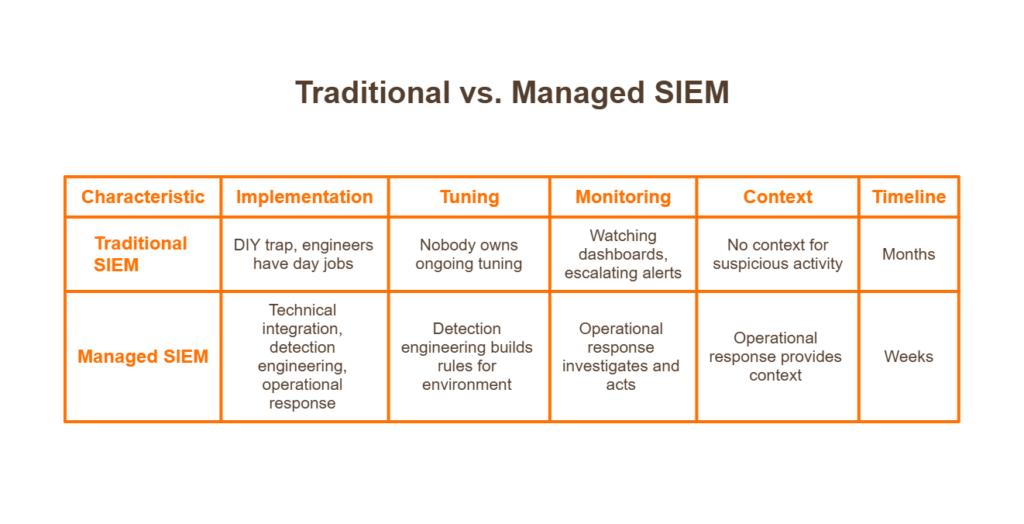
The DIY trap catches organizations repeatedly. You have skilled engineers, you bought enterprise-grade tooling, so implementation should be straightforward. Except your engineers have day jobs. They configure basic log forwarding, enable out-of-the-box detection rules, and move on to the next fire. Nobody owns ongoing tuning. Alert fatigue sets in by month three.
Traditional MSSPs offer another path: they’ll deploy your SIEM and even monitor it for you. But “monitoring” often means watching dashboards and escalating alerts back to your team with “please investigate” tickets. ❌ They deploy but don’t tune. They monitor but don’t respond. They generate alerts but don’t provide context about whether the suspicious PowerShell execution was your IT admin or an attacker.
The Managed SIEM Transformation
Implementation without operationalization is shelfware. Operationalization without context is alert noise.
This is the shift managed SIEM represents: moving from “we installed the software” to “we’re detecting and responding to threats.” The difference matters because attackers don’t care about your deployment timeline; they exploit the gap between tool installation and effective security operations.
Modern managed SIEM combines three elements that traditional approaches separate:
- Technical integration (connecting your log sources)
- Detection engineering (building rules that match your environment)
- Operational response (humans who investigate and act on alerts)
When these run in parallel with tight feedback loops, implementation compresses from months to weeks.
How We Approach This at UnderDefense
At UnderDefense, we built our onboarding around a simple principle: you shouldn’t wait six months to start detecting threats. Our 30-day deployment model works because we’ve pre-built integrations for 250+ security tools, CrowdStrike, SentinelOne, Microsoft Defender, Okta, AWS, and the stack you already own.
We don’t ask you to rip and replace. We connect to what you have, start flowing data immediately, and begin tuning detection rules while integration continues. Our analysts learn your environment during implementation, not after. By day 30, you have 24/7 coverage with custom detection logic, not a promise to configure rules “in phase two.”
The Practitioner Perspective
⏰ The real question isn’t “how long does SIEM implementation take?” It’s “how long until you’re actually protected?”
We’ve seen organizations with million-dollar Splunk deployments breached because nobody configured proper correlation rules. We’ve inherited environments where the SIEM had been “implemented” for two years but couldn’t detect basic attacks. Tools don’t protect organizations; operationalized tools with humans watching them do.
Q2: How Long Does Managed SIEM Implementation Actually Take?
Direct Timeline Ranges by Organization Size
Let me give you realistic numbers based on what we see across hundreds of deployments, not vendor-optimistic marketing timelines.
| Organization Profile | Typical Timeline | Key Variables |
| Small/Mid-Market (100-500 endpoints) | 2-4 weeks | Standard cloud stack, limited legacy systems |
| Mid-Enterprise (500-2,000 endpoints) | 4-8 weeks | Multiple business units, compliance requirements |
| Large Enterprise (2,000+ endpoints) | 8-16 weeks | Complex hybrid infrastructure, M&A environments |
These assume a managed provider with pre-built integrations. Self-managed SIEM deployments typically run 6-12 months for the same scope, and often longer when you factor in the inevitable “we didn’t account for parser development” delays.
Variables That Extend Your Timeline
⚠️ Several factors push implementation past baseline estimates:
- Log source diversity: Connecting 15 standard tools differs from integrating 40+ sources, including legacy on-prem systems with non-standard formats. Each unique log type needs parser validation.
- Compliance complexity: HIPAA and PCI-DSS environments add 2-4 weeks for control mapping, evidence generation workflows, and audit trail configuration.
- Internal approval processes: Organizations requiring security committee sign-off at each phase add latency that compounds across milestones.
- Undefined detection priorities: When stakeholders can’t articulate “what do we need to detect first?”, implementation stalls while everyone debates scope.
- Legacy infrastructure: Mainframes, proprietary applications, and systems without API access require custom connector development.
Variables That Compress Your Timeline
✅ Conversely, several factors accelerate deployment:
- Standardized security stack: Organizations running Microsoft, CrowdStrike, or other major platforms benefit from mature, tested integrations.
- Cloud-native infrastructure: AWS, Azure, and GCP provide API-driven log access that eliminates agent deployment complexity.
- Dedicated project owner: A single empowered stakeholder who can make decisions, provide access, and remove blockers, cutting coordination overhead dramatically.
- Provider experience with your stack: Pre-built integrations eliminate weeks of custom parser development.
Industry Benchmark Comparison
| Deployment Model | Typical Timeline | Resource Requirements | Ongoing Optimization |
| Self-Managed | 6-12 months | 4-8 FTEs during deployment | Customer-owned |
| Traditional MSSP | 3-6 months | 2-4 FTEs + vendor PS | Limited/additional cost |
| Modern Managed SIEM | 2-8 weeks | 4-8 hours/week internal | Included |
The gap between self-managed and modern managed approaches comes down to pre-built integrations and parallel workstreams. Traditional implementations run sequentially: complete discovery, then integrate, then tune. Modern approaches overlap phases, and tuning begins as soon as data flows.
What UnderDefense Delivers
Our 30-day turnkey deployment eliminates the parser development and custom connector work that stretches traditional implementations. With 250+ pre-built integrations, we connect to your existing stack without months of professional services.
💰 More importantly, that timeline includes detection tuning and analyst onboarding, not just technical integration. When day 30 arrives, you have operational coverage, not a configured tool awaiting “phase two optimization.”
Q3: What Happens Between Contract Signing and Kickoff?
The Scenario Nobody Talks About
You signed the contract on Tuesday. Legal approved the terms, procurement processed the PO, and everyone celebrated closing another security initiative. It’s now two weeks later.
Nothing has happened.
Legal is still reviewing the data processing agreement addendum. IT hasn’t created the service accounts you need to grant access. Your CISO is asking for status updates, and all you can say is “we’re waiting on internal dependencies.” The vendor’s onboarding coordinator sent a checklist, but half the items require approvals from people who don’t know this project exists.
⏰ This dead zone between signature and kickoff is where momentum dies, and nobody warned you it was coming.
Why This Pattern Repeats
Traditional providers treat the contract-to-kickoff period as “customer responsibility.” They send the requirements documentation and wait. Meanwhile:
- DPA negotiations restart: Even with standard terms, legal teams want modifications. Without pre-approved templates, this adds 1-2 weeks.
- Access provisioning stalls: Service accounts, API tokens, and firewall rules require IT tickets that sit in queues behind higher-priority work.
- Stakeholder scheduling fails: The kickoff meeting requires your CISO, IT director, and compliance lead. Finding 90 minutes across three calendars takes weeks.
- Scope creep emerges: Without structure, stakeholders add “while we’re at it” requirements that weren’t in the original agreement.
The Hidden Costs of Delayed Kickoff
❌ Each week of delay compounds real business impact:
- Continued exposure: The threats you bought protection against don’t pause while you schedule meetings. Every week delayed is another week without coverage.
- Stakeholder confidence erosion: The leadership approved the budget, expecting rapid results. Weeks of “still waiting to start” raise questions about the decision.
- Sunk cost anxiety: Money spent on a tool sitting unused creates pressure to show progress, leading to rushed, incomplete implementations.
- Team context loss: The engineers who evaluated the solution move to other priorities. By kickoff, institutional knowledge has degraded.
How We Systematize the Administrative Phase
At UnderDefense, we treat contract-to-kickoff as our problem to solve, not yours. Our pre-implementation protocol runs parallel workstreams:
✅ 48-72 hours to kickoff is our standard, not an aspiration. Here’s how:
- Pre-approved DPA templates: Our data processing agreements are structured to satisfy standard legal requirements. Most legal teams approve within 24-48 hours.
- Dedicated onboarding coordinator: A single point of contact who owns the timeline, chases dependencies, and escalates blockers.
- Parallel access provisioning: While legal reviews DPA, we’re simultaneously working with IT on service accounts and network access.
- Pre-built stakeholder meeting structure: 60-minute discovery session with a clear agenda, not open-ended scoping discussions that drift.
The Contrast That Matters
Traditional provider timeline: 2-4 weeks from signature to kickoff, dependent on customer-driven coordination.
UnderDefense timeline: 48-72 hours, because we’ve systematized the administrative friction that delays most deployments. Your team provides access and decisions. We handle execution.
Q4: What Are the Core Phases of SIEM Onboarding?
Phase 1: Discovery & Planning (Days 1-7)
The first week establishes the foundation on which everything else builds. Skip this phase or rush it, and you’ll pay for it in extended tuning cycles later.
Key Activities:
- Asset inventory: Catalog all log sources, endpoints, network devices, cloud services, identity systems, and applications. You can’t protect what you don’t know exists.
- Crown jewels identification: Which systems contain sensitive data? Which support critical business processes? This drives integration priority.
- Compliance mapping: Document regulatory requirements (SOC 2, HIPAA, PCI-DSS, ISO 27001) and map them to detection requirements.
- Detection priority alignment: What matters most? Ransomware prevention? Insider threat? Data exfiltration? Answers shape correlation rule priorities.
✅ Deliverable: Log source catalog, prioritized integration roadmap, compliance-to-detection mapping document.
Phase 2: Integration & Data Onboarding (Days 8-21)
This is where technical work happens, connecting your security ecosystem to unified visibility.
Key Activities:
- API connections: Configure authenticated access to cloud services, SaaS applications, and identity providers.
- Log forwarding setup: Configure syslog, agent deployment, or native integrations for on-premises systems.
- Parser deployment: Apply or develop log parsing rules that normalize diverse formats into queryable data.
- Data validation: Confirm logs are flowing, timestamps are accurate, and critical fields are parsed correctly.
- Baseline establishment: Collect initial data to understand normal patterns before enabling alerting.
⚠️ Common Pitfall: Organizations rush to enable detection rules before validating data quality. Garbage in, garbage out; malformed logs generate false positives that erode analyst trust.
Phase 3: Detection Tuning & Optimization (Days 22-30)
Raw alerts aren’t security; tuned detection aligned to your environment is.
Key Activities:
- Correlation rule deployment: Enable detection logic for prioritized use cases, credential theft, lateral movement, data exfiltration, and malware execution.
- False positive reduction: Identify legitimate activity generating alerts (backup processes, admin scripts, scheduled tasks) and tune thresholds or create allowlists.
- Alert threshold calibration: Adjust sensitivity based on your risk tolerance and analyst capacity.
- Escalation workflow configuration: Define what gets escalated to your team vs. handled by managed analysts.
- Runbook development: Document response procedures for common alert types.
Phase 4: Operational Handover (Days 28-30)
The transition from “implementation project” to “ongoing security operations.”
Key Activities:
- SOC handoff: Managed analysts assume 24/7 monitoring responsibility with full environmental context.
- Communication channel setup: Configure Slack, Teams, or email for alert notifications and analyst communication.
- Reporting cadence establishment: Schedule weekly/monthly reports covering incidents, coverage metrics, and optimization recommendations.
- First threat hunt completion: Proactive analysis validates detection coverage and establishes baseline security posture.
Why Parallel Execution Matters
At UnderDefense, these phases overlap rather than run sequentially. Integration begins during discovery. Tuning starts as soon as data flows; we don’t wait for “complete” integration before enabling detection.
⏰ The 30-day timeline assumes this overlap. Waterfall execution, finish phase 1 completely before starting phase 2, doubles deployment duration without improving outcomes.
Q5: What Integration Requirements and Prerequisites Should You Prepare?
Complete this technical and compliance readiness assessment before your managed SIEM kickoff to eliminate delays:
Getting log sources connected sounds straightforward until you’re two weeks in and nobody knows the service account passwords for your firewall. I’ve seen 90-day implementation timelines balloon to 9 months because organizations underestimated the prep work. Here’s the checklist that separates smooth deployments from frustrating ones.
✅ Technical Readiness Checklist
☐ Network diagram with log source inventory, Document every system generating security-relevant logs: firewalls, endpoints, cloud consoles, SaaS applications, identity providers
☐ Admin credentials/service accounts for SIEM, EDR, firewall, cloud consoles, identify who owns each credential, and ensure they’re accessible during deployment
☐ Firewall rules for log forwarding, Pre-approve ports, IP ranges, and protocols required for secure telemetry transmission
☐ API access tokens for cloud services (AWS, Azure, GCP, M365) generate read-only tokens with appropriate scope for security monitoring
☐ VPN/secure access for provider SOC team, Determine if your provider needs direct environment access or if API-based integration is sufficient
✅ Compliance & Organizational Readiness
☐ Compliance requirements documented, define which frameworks apply: SOC 2, HIPAA, PCI-DSS, ISO 27001, and specific control mappings
☐ Audit evidence requirements mapped, know what artifacts auditors expect, and confirm your provider can generate them automatically
☐ Internal project owner designated with decision authority, Someone empowered to approve changes without committee votes
☐ Escalation contacts identified across security, IT, and business units. Define who gets called at 2 AM and for what severity levels
☐ Communication channel preferences confirmed: Slack, Teams, email, SMS? Decide before deployment
☐ Change management windows defined. When can the provider tune detection rules without disrupting operations?
⭐ Score Interpretation
| Items Checked | Readiness Level |
| 10+ items | Ready for rapid deployment, expect minimal friction |
| 6-9 items | Minor preparation needed, budget 1-2 extra weeks |
| Below 6 | Expect a 1-2 week delay for prerequisite completion |
How We Approach This at UnderDefense
We provide pre-built integration templates for 250+ security tools, eliminating custom parser development that derails timelines. During onboarding, we supply the technical checklist, assist with access provisioning, and include forever-free compliance kits with MDR, SOC 2, HIPAA, and ISO 27001 evidence generation included from day one. You shouldn’t need a professional services engagement just to get your existing tools talking to each other.
Q6: What Are Client Responsibilities vs. Provider Responsibilities During Implementation?
Misaligned expectations kill implementations faster than technical complexity. I’ve watched organizations assume their MDR provider would “handle everything,” then spend months in finger-pointing when critical log sources remained disconnected. Clear ownership from day one prevents this.
📋 Client Responsibilities
| Area | Specific Tasks |
| Access Provisioning | Provide credentials, API tokens, and network access within agreed timelines |
| Internal Stakeholder Availability | Ensure IT, security, and compliance contacts are reachable during deployment |
| Business Context Sharing | Communicate crown jewels, critical processes, VIP users, and acceptable risk thresholds |
| Approval Decisions | Sign off on detection rule tuning, escalation thresholds, and response playbooks |
| Escalation Contact Designation | Define who receives alerts at which severity levels, including after-hours |
| Compliance Scope Definition | Clarify which frameworks apply and what evidence formats auditors expect |
📋 Provider Responsibilities
| Area | Specific Tasks |
| Technical Integration | Connect all designated log sources within agreed SLAs |
| Parser Development | Build custom parsers for non-standard log formats |
| Correlation Rule Creation | Develop detection logic mapped to your threat model |
| Detection Tuning | Reduce false positives through iterative refinement |
| 24/7 Monitoring | Provide continuous threat surveillance with defined MTTR |
| Incident Response | Contain and remediate threats per agreed playbooks |
| Compliance Evidence Generation | Produce audit-ready reports automatically |
| Reporting | Deliver regular posture assessments and incident summaries |
🤝 Shared Responsibilities
- Crown jewels identification, Client provides business context; provider applies threat modeling methodology
- False positive tuning Client flags inaccurate alerts; provider adjusts detection logic
- Compliance mapping, Client defines requirements; provider generates corresponding evidence
⏰ Resource Expectation
Expect 4-8 hours/week of internal time during implementation (project owner + technical contacts), dropping to 1-2 hours/week post-deployment for reviews and escalation handling. If your provider requires significantly more, that’s a signal their integration process isn’t mature.
How UnderDefense Manages This
Alignment is the key problem every organization has; you need separate people dealing with security and the rest of ops, and aligning outcomes for each. Our dedicated onboarding coordinator manages the project timeline and chases internal stakeholders on your behalf. You shouldn’t need to project-manage your MDR provider.
Q7: What Causes SIEM Implementation Delays and How Do You Avoid Them?
Your 3-month SIEM project is now entering month 7. The vendor blames “custom integration complexity.” Your team blames “scope creep.” Leadership blames you. Everyone’s frustrated, and you’re still not fully operational.
This scenario plays out constantly. Projects stretching from 3 months to 2 years are more common than vendors admit. Let me walk through why this happens and how to prevent it.
⚠️ Root Causes of Implementation Delays
- Legacy systems with non-standard log formats, Custom parsers take weeks when vendors lack pre-built connectors
- Undefined detection priorities, without clear crown jewels, the scope expands indefinitely
- Insufficient internal project ownership. Decisions stall when nobody has the authority to approve
- Provider inexperience with your tool stack. Generic MDR providers struggle with enterprise-specific configurations
- Compliance requirements discovered mid-project, Auditors surface new evidence that needs to be addressed after deployment starts
- Alert tuning is taking longer than expected. False positive floods require iterative refinement
💸 Hidden Costs of Delay
- An extended exposure window, every week without detection coverage, is a week during which attackers operate freely
- Team morale impact, your security team burns out managing implementation instead of threats
- Leadership confidence erosion and missed deadlines undermine trust in security initiatives
- Budget overruns, Professional services fees compound while timelines slip
- Opportunity cost, Strategic projects stall while everyone fights the deployment fire
✅ Prevention Strategies
- Define crown jewels and detection priorities upfront. Know what matters before integration begins.
- Designate an empowered project owner, Someone who can approve without committee votes.
- Choose a provider with pre-built integrations for your stack. Ask for the connector count and deployment timelines.
- Document compliance requirements before kickoff. Surface audit evidence needs to be early.
- Establish go-live criteria in the contract, define what “operational” means measurably.
- Plan for a 30-60 day tuning period post-deployment. First detection rules always need refinement.
What Practitioners Say
“Very time-consuming and anti-productive in a complex application environment.”
— Verified User in Civil Engineering, Enterprise Artic Wolf G2 Review“Terrible documentation. Very complicated and manual setup. Very limited compatibility/integration with other security tools.”
— IT InfoSec Manager, 3.0/5.0 Alert Logic Gartner Review
How We Handle This at UnderDefense
We publish fixed 30-day implementation timelines because our 250+ pre-built integrations eliminate custom parser development that causes most delays. During onboarding, integration templates and experienced engineers accelerate deployment. If we can’t connect your tools in 30 days, we haven’t done our job.
Q8: How Do You Identify Critical Assets and Prioritize Data Sources?
Crown jewels = systems containing sensitive data, supporting critical business processes, or representing the highest breach impact. These determine integration priority order, not log volume or technical convenience.
Most organizations approach this backward. They prioritize noisy systems that generate millions of events, firewalls, and web servers, while deprioritizing quiet systems where compromise means game over. A firewall generates enormous log volume, but matters less than your identity system, where one compromised admin account unlocks the entire environment.
🔍 Identification Framework
Step 1: Map Data Classification
Inventory where PII, PHI, financial data, and intellectual property reside. These are breach targets.
Step 2: Identify Business-Critical Systems
Which systems stop revenue if compromised? ERP, CRM, production databases, and payment processing.
Step 3: Assess Regulatory Scope
What’s in-scope for SOC 2, HIPAA, and PCI? Compliance violations carry penalties beyond breach costs.
Step 4: Evaluate Attack Surface
Internet-facing systems and privileged access paths represent attacker entry points. Map them explicitly.
📊 Prioritization Matrix
| Priority Tier | Systems | Timeline |
| Tier 1 (Immediate) | Identity systems (AD, Okta, Azure AD), email, endpoints, cloud consoles | Week 1 |
| Tier 2 (Week 2) | Network perimeter, databases, critical business applications | Week 2 |
| Tier 3 (Week 3-4) | Supporting infrastructure, development environments, and ancillary systems | Week 3-4 |
❌ Common Mistake
Organizations prioritize by log volume rather than business impact. A noisy firewall generates millions of events, but it may matter less than a quiet identity system where compromise means full environment access. Don’t let technical convenience override threat reality.
The Question Most Organizations Can’t Answer
What is your estimated ransomware cost? Downtime, recovery, reputation damage, and regulatory fines, quantified. Most organizations can’t answer this, but it drives everything about what to protect first. If you don’t know the breach cost of a specific system, you can’t rationally prioritize its monitoring.
How UnderDefense Approaches This
Our discovery phase includes a structured crown jewels workshop that maps your specific business context to detection priorities, ensuring we’re protecting what matters most from day one. We ask the hard questions upfront: What systems represent existential risk? What’s your ransomware recovery cost estimate? Where are your compliance boundaries? Then we build detection coverage that reflects actual business impact, not just technical completeness.
Q9: How Do You Manage False Positives and Tune Detection Rules?
It’s 2:47 AM on a Tuesday. Your phone buzzes with the 14th “critical alert” this week from your SIEM. You log in, spend 45 minutes investigating, and discover it’s another false positive, a developer running a legitimate script. You’ve been awake for an hour. You still don’t know if you missed something real.
This scenario destroys security teams. Alert fatigue isn’t just annoying; it’s operationally dangerous.
⚠️ Why This Happens
Your EDR sees endpoint behavior, but your identity tool sees user context; neither can reason across both. You become the manual correlation layer, investigating alerts that should be auto-verified. Detection rules ship with vendor defaults, not your organization’s baseline.
Traditional MDR providers often compound this problem:
“Some alerts are just a regurgitation of Microsoft alerts, which means duplicates. Not confident enough to suppress Microsoft alerts.”
— Sr Cybersecurity Engineer, Manufacturing Artic Wolf Gartner Review“We constantly battle with false positives, and feature requests take a long time.”
— Manager, Vulnerability Management, 2.0/5.0 Rapid 7 Gartner Review
✅ The Tuning Methodology
Effective false positive management requires structured iteration:
- Baseline establishment, First 2 weeks of data collection to understand normal behavior
- False positive categorization, System noise vs. legitimate activity vs. needs investigation
- Rule threshold adjustment: Modify detection sensitivity based on your environment
- Allowlisting for known-good patterns, Developer tools, IT admin activities, and scheduled processes
- Weekly tuning cycles for the first 90 days, monthly thereafter
The critical insight: tuning is never “done.” Your environment changes, attackers adapt, and static detection eventually becomes no detection.
How We Handle This at UnderDefense
We make investigations faster by ensuring your team only reviews confirmed, actionable incidents — not thousands of maybes. Through custom detection tuning and direct user verification, we cut 99% of noise before it reaches your analysts. When UnderDefense MAXI flags behavioral alerts requiring context (“Did Jane run that PowerShell script?”), our analysts reach out directly via Slack or Teams to verify. Your team spends time responding to real threats, not chasing false positives. Our alert triage and investigation capabilities accelerate every step from detection to resolution.
“Before the guys from UD stepped in, we were getting bombarded with alerts from all our security tools. Their team cleaned up our configurations and got the noise under control within the first week.”
— Verified User, Marketing and Advertising G2 Review
Organizations without ongoing tuning see 40% increase in false positives within 6 months. We maintain 99% alert noise reduction through continuous optimization, because the alternative is analyst burnout and missed threats hiding in the noise.
Q10: How Does SIEM Integrate with Compliance Requirements (SOC 2, HIPAA, ISO 27001)?
For most organizations, SIEM implementation is driven as much by compliance requirements as security operations. SOC 2, HIPAA, PCI-DSS, and ISO 27001 all require logging, monitoring, and incident response capabilities. SIEM is the technical foundation that makes these controls demonstrable.
🔐 The Compliance-SIEM Alignment
Understanding how frameworks map to SIEM capabilities clarifies implementation priorities:
| Framework | Requirement | SIEM Capability |
| SOC 2 CC7.2 | Incident detection and response | Real-time alerting, incident documentation |
| HIPAA §164.312 | Audit controls and access monitoring | Access logs, activity tracking, and PHI access alerts |
| PCI-DSS 10.x | Comprehensive logging | Transaction logs, access records, and log retention |
| ISO 27001 A.12.4 | Event logging and monitoring | Security event correlation, anomaly detection |
A properly implemented managed SIEM addresses all of these simultaneously. The challenge is ensuring your implementation actually produces the evidence auditors expect.
❌ The Compliance Gap
Traditional SIEM implementations treat compliance as separate from security operations; one team configures detection rules, another extracts audit reports. This creates duplicate work and evidence gaps during audits.
“If you need something to check the box for compliance, it’s a good bundle for the costs.”
— Verified User, Health, Wellness and Fitness, 2.5/5.0 Alert Logic G2 Review
“Checkbox compliance” misses the point. Compliance frameworks exist to ensure actual security practices; treating them as paperwork exercises creates risk and wastes resources.
✅ The Integrated Approach
Modern managed SIEM should generate compliance evidence automatically:
- Access logs for auditors, who accessed what, when, and from where
- Incident response documentation, Detection, containment, and remediation records
- Security monitoring proof, Active surveillance evidence, coverage metrics
- Retention policy enforcement, Logs preserved per regulatory requirements
Implementation should map controls to detection rules from day one, not retrofit compliance reporting onto existing configurations.
How UnderDefense Handles This
Forever-free compliance kits are included with MDR, SOC 2, HIPAA, and ISO 27001 evidence generation, automated. Your SIEM implementation produces audit-ready documentation from the start, not as an afterthought.
“They’ve also made our audit process much less painful. The reports from their platform give us clear evidence of our security controls and incident response capabilities.”
— Verified User, Marketing and Advertising G2 Review
When auditors ask about your security posture, you should be able to pull up exactly what they need, not scramble to generate reports that should have existed all along.
Q11: What Should Your Complete Managed SIEM Implementation Checklist Include?
Use this comprehensive checklist to track managed SIEM implementation from contract signing through operational handover:
📋 Pre-Implementation Phase
| ☐ | Contract and DPA executed |
| ☐ | Project owner designated with decision authority |
| ☐ | Kickoff meeting scheduled |
| ☐ | Technical contacts identified (IT, Security, Compliance) |
| ☐ | Access credentials provisioned (admin accounts, API tokens) |
| ☐ | Crown jewels documented (critical systems, sensitive data locations) |
| ☐ | Compliance requirements mapped (SOC 2, HIPAA, PCI scope) |
| ☐ | Communication channels confirmed (Slack, Teams, email preferences) |
📋 Implementation Phase
| ☐ | Discovery workshop completed |
| ☐ | Log source inventory validated. |
| ☐ | Integrations deployed and tested. |
| ☐ | Data flow confirmed (telemetry reaching SIEM) |
| ☐ | Detection rules enabled |
| ☐ | False positive baseline established.d |
| ☐ | Tuning cycles scheduled (weekly for first 90 days) |
| ☐ | Escalation workflows configured |
| ☐ | Compliance evidence generation verified |
📋 Go-Live & Validation Phase
| ☐ | 24/7 monitoring confirmed active |
| ☐ | First threat hunt completed |
| ☐ | Incident response tested (tabletop or real) |
| ☐ | Reporting cadence established |
| ☐ | Stakeholder access verified |
| ☐ | 30/60/90-day optimization schedule confirmed |
| ☐ | Audit readiness validated |
⭐ Score Interpretation
| Items Completed | Status |
| All items | Ready for operational handover |
| Missing 1-3 items | Minor gaps, address before go-live |
| Missing 4+ items | Significant gaps, delay go-live until resolved |
What UnderDefense Provides
Every UnderDefense onboarding includes a tracked implementation checklist with real-time status visibility; you always know exactly where your deployment stands and what’s next. Our MDR solution ensures seamless handover from implementation to operations.
“The speed of onboarding was a delightful surprise. In times where integrating new systems can take weeks, UnderDefense had us up and running in no time.”
— Valeriia D., Marketing Specialist G2 Review
“The seamless integration and optimization of the EDR platform, CrowdStrike, has been impressive. Despite the complexity involved, they delivered the deployment to 1200 endpoints in just 23 business days.”
— Oleksii M., Mid-Market G2 Review
Request our SIEM Implementation Checklist template for a downloadable version you can use for your own deployment tracking.
1. How long does a typical managed SIEM implementation take from contract signing to full deployment?
We typically achieve full managed SIEM deployment within 30 days for organizations with standard security stacks and prepared prerequisites. However, implementation timelines vary based on environment complexity:
- Simple environments (under 500 endpoints, standard tools): 2-4 weeks
- Mid-market environments (500-2,000 endpoints, hybrid cloud): 4-6 weeks
- Complex enterprise environments (2,000+ endpoints, legacy systems): 6-12 weeks
The biggest timeline variable is organizational readiness, not technical complexity. We have seen 90-day projects balloon to 9 months because organizations underestimated prerequisite preparation. Key factors include log source inventory completeness, credential accessibility, and internal project owner availability. When prerequisites are ready, our 250+ pre-built integration templates eliminate the custom parser development that causes most delays.
2. What technical prerequisites should we prepare before managed SIEM onboarding begins?
Completing technical readiness before kickoff eliminates the delays that derail most implementations. We recommend preparing:
- Network diagram with log source inventory: Document every system generating security-relevant logs, including firewalls, endpoints, cloud consoles, SaaS applications, and identity providers
- Admin credentials and service accounts: Ensure SIEM, EDR, firewall, and cloud console credentials are accessible during deployment
- Firewall rules for log forwarding: Pre-approve ports, IP ranges, and protocols for secure telemetry transmission
- API access tokens: Generate read-only tokens for AWS, Azure, GCP, and M365 with appropriate security monitoring scope
Organizations checking 10+ prerequisite items experience minimal deployment friction, while those with fewer than 6 items should expect 1-2 week delays. Our integration templates cover 250+ security tools to accelerate this process.
3. What are the client's responsibilities versus the provider's responsibilities during SIEM implementation?
Clear ownership from day one prevents the finger-pointing that kills implementations. Here is how we define the split:
Client responsibilities include:
- Providing credentials, API tokens, and network access within agreed timelines
- Ensuring IT, security, and compliance contacts remain reachable during deployment
- Communicating crown jewels, critical processes, and acceptable risk thresholds
- Signing off on detection rule tuning and escalation thresholds
Provider responsibilities include:
- Connecting all designated log sources within agreed SLAs
- Building custom parsers for non-standard log formats
- Developing detection logic mapped to your threat model
- Providing continuous 24/7 threat monitoring with defined MTTR
Expect 4-8 hours per week of internal time during implementation, dropping to 1-2 hours per week post-deployment. If your provider requires significantly more, their integration process likely is not mature.
4.What causes managed SIEM implementation delays, and how can we avoid them?
We have observed projects stretch from 3 months to 2 years when these root causes go unaddressed:
- Legacy systems with non-standard log formats: Custom parsers take weeks when vendors lack pre-built connectors
- Undefined detection priorities: Without clear crown jewels, the scope expands indefinitely
- Insufficient internal project ownership: Decisions stall when nobody has the authority to approve
- Compliance requirements discovered mid-project: Auditors surface new evidence that needs to be addressed after deployment starts
Prevention strategies we recommend:
- Define crown jewels and detection priorities before integration begins
- Designate an empowered project owner who can approve without committee votes
- Choose a provider with pre-built integrations for your stack
- Document compliance requirements before kickoff
- Establish go-live criteria in the contract
Hidden delay costs include extended exposure windows, team burnout, and leadership confidence erosion.
5. How do you manage false positives and tune detection rules after SIEM deployment?
Alert fatigue destroys security teams. Organizations without ongoing tuning see 40% increase in false positives within 6 months. We follow a structured tuning methodology:
- Baseline establishment: First 2 weeks of data collection to understand normal behavior
- False positive categorization: System noise vs. legitimate activity vs. needs investigation
- Rule threshold adjustment: Modify detection sensitivity based on your environment
- Allowlisting for known-good patterns: Developer tools, IT admin activities, scheduled processes
- Weekly tuning cycles for the first 90 days, monthly thereafter
We reduce customer-facing alerts by 99% through custom detection tuning and direct user verification. When UnderDefence MAXI flags behavioral alerts requiring context, our analysts reach out directly via Slack or Teams to verify. You review confirmed incidents, not thousands of maybes. Our alert triage capabilities ensure only actionable threats reach your team.
6. How does managed SIEM integrate with compliance requirements like SOC 2, HIPAA, and ISO 27001?
SIEM implementation is driven as much by compliance requirements as security operations. Here is how frameworks map to SIEM capabilities:
|
Framework |
Requirement |
SIEM Capability |
|
SOC 2 CC7.2 |
Incident detection and response |
Real-time alerting, incident documentation |
|
HIPAA §164.312 |
Audit controls and access monitoring |
Access logs, activity tracking, and PHI access alerts |
|
ISO 27001 A.12.4 |
Event logging and monitoring |
Security event correlation, anomaly detection |
Modern managed SIEM should generate compliance evidence automatically: access logs for auditors, incident response documentation, security monitoring proof, and retention policy enforcement. We include forever-free compliance kits with MDR, providing SOC 2, HIPAA, and ISO 27001 evidence generation from day one. Your implementation produces audit-ready documentation from the start, not as an afterthought.
7. How do you identify critical assets and prioritize data sources for SIEM integration?
Most organizations approach prioritization backward. They prioritize noisy systems generating millions of events while deprioritizing quiet systems where compromise means game over. A firewall generates enormous log volume, but matters less than your identity system, where one compromised admin account unlocks the entire environment.
We recommend this prioritization framework:
- Tier 1 (Week 1): Identity systems (AD, Okta, Azure AD), email, endpoints, cloud consoles
- Tier 2 (Week 2): Network perimeter, databases, critical business applications
- Tier 3 (Week 3-4): Supporting infrastructure, development environments, ancillary systems
Our discovery phase includes a structured crown jewels workshop that maps your specific business context to detection priorities. We ask hard questions upfront: What systems represent existential risk? What is your ransomware recovery cost estimate? Then we build threat detection coverage reflecting actual business impact, not just technical completeness.
8. What should a complete managed SIEM implementation checklist include?
We track implementation from contract signing through operational handover using comprehensive checklists:
Pre-Implementation Phase:
- Contract and DPA executed
- Project owner designated with decision authority
- Technical contacts identified (IT, Security, Compliance)
- Crown jewels documented
- Compliance requirements mapped
Implementation Phase:
- Discovery workshop completed
- Log source inventory validated
- Integrations deployed and tested
- Detection rules enabled
- Tuning cycles scheduled (weekly for first 90 days)
Go-Live and Validation Phase:
- 24/7 monitoring confirmed active
- First threat hunt completed
- Incident response tested
- 30/60/90-day optimization schedule confirmed
Every UnderDefense onboarding includes tracked implementation with real-time status visibility. You always know exactly where your deployment stands and what comes next.
The post Managed SIEM Implementation: 30 Days or 9 Months? What Determines Your Timeline appeared first on UnderDefense.