When the same MFA fatigue attack lands in two different AI security copilots, the outputs diverge within the first sixty seconds. One copilot starts pulling threads. The other starts summarizing the alert. By the time both finish their first investigation pass, one has confirmed account compromise and named the prior incident that should have caught it. The other has concluded there is no current evidence of compromise.
This is what happened when we ran a real MFA fatigue scenario through MAXI Copilot and Microsoft Security Copilot side by side. The investigative behavior of the two AI systems revealed why “we already have an AI security tool” stops being a reassuring sentence the moment a real incident starts.
This article explains what each tool has produced, what the cost difference looks like in practice, and what you should know before signing a contract.
The Test Setup: One Incident, Two AI Copilots
The scenario was an MFA fatigue attack against a corporate user. An attacker bombarded the target with repeated MFA push notifications until the user approved one out of fatigue. Once inside, the attacker created a mail forwarding rule to siphon inbound messages to an external address and began moving toward sensitive files.
The investigative question we put to both copilots was the same: Has this account been compromised, and what is the scope?
Both tools received identical telemetry: identity logs from the IdP, mail audit logs from Microsoft 365, endpoint signals, and historical alerts from prior weeks. Both were given the same time window. The only difference was the AI doing the reasoning.
What MAXI Copilot Found, and How Fast
MAXI Copilot initiated the investigation by querying multiple data sources simultaneously. Identity logs, incident history, Elastic indexes, and the active security alert queue. The first action was a lookup against historical context, before any conclusion was drawn.
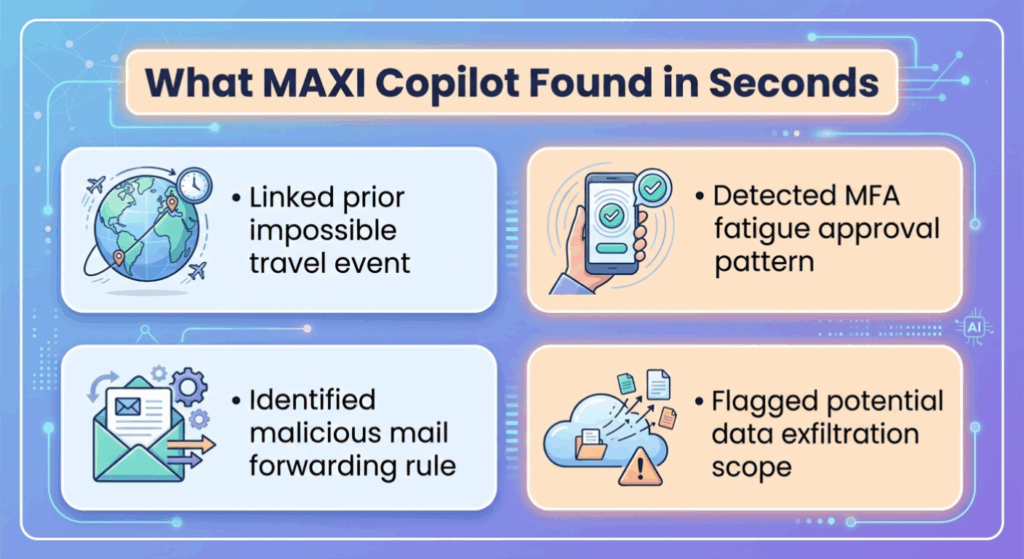
Within the first investigative step, MAXI surfaced a prior impossible-travel event tied to the same user. That event predated the current MFA fatigue alert by several days and had been logged but not connected to a chain. MAXI made the connection automatically and kept digging.
The investigation continued through three layers of context:
Layer one: identity behavior
Login origin, device fingerprint, MFA approval pattern. MAXI flagged that the approval came after multiple denied attempts within a compressed window, which is the signature of fatigue-driven approval.
Layer two: post-authentication activity
MAXI pulled the mail audit log and identified the new forwarding rule created within minutes of the suspicious login. It mapped the rule’s external destination and flagged the configuration as a known data exfiltration pattern.
Layer three: lateral movement check
MAXI cross-referenced file access logs against the user’s normal behavioral baseline. It identified files accessed for the first time in the past 90 days and surfaced them as candidates for exfiltration scope review.
The verdict came back in plain language: account compromise confirmed, with the attack chain reconstructed from initial MFA fatigue through forwarding rule creation, with a list of files and time stamps an analyst could act on immediately. The output included specific remediation steps: revoke active sessions, disable the forwarding rule, force password reset, review file access for the listed objects, and check for similar patterns across other users in the same group.
It took seconds for MAXI to complete the investigation.
What Microsoft Security Copilot Delivered
Microsoft Security Copilot opened the investigation by initiating its first search query. While MAXI was already three layers deep, MS Copilot was still processing its first lookup against the alert.
The output, when it arrived, was a structured summary of the alert itself. The MFA fatigue event was named correctly. The user was identified. The general category of the threat was tagged. Beyond that, the analysis stopped at the alert’s boundary.
MS Copilot did not query the prior impossible-travel event. It treated the current alert as the unit of investigation, rather than as one node in a longer chain. It did not surface the mail forwarding rule as a connected event, even though the data was available in the same Microsoft 365 audit log it had access to. It did not reconstruct the file access pattern.
The conclusion delivered was: no current evidence of compromise based on the alert under review.
That answer is technically defensible. The MFA fatigue alert, by itself, isolated from the broader context, does show only an unusual approval pattern. The problem is that real attacks rarely sit inside a single alert. They live in the gaps between alerts, and they depend on the AI’s willingness to keep pulling threads after the first answer arrives. MS Copilot did what it was asked. It summarized the alert. The investigative work that connects an MFA fatigue event to a forwarding rule and a file access anomaly is work that it does not perform unless the analyst manually prompts each step.
For a CISO evaluating an AI security tool, the implication is operational. If your AI summarizes alerts but does not chain them, the analyst still does the chaining manually. The AI saves time on triage and adds time on investigation, because the analyst now has to second-guess every “no evidence of compromise” output by re-running the same questions across other consoles.
The Price You Pay, and the Price You Don’t See
Microsoft Security Copilot uses a Security Compute Unit (SCU) pricing model. The published rates are $4 per hour per provisioned SCU and $6 per hour for overage capacity.
A baseline production deployment typically requires multiple SCUs running continuously to handle real-time investigation workloads. At minimum sustainable allocation, the annual cost lands at roughly $105,000 per year before any overage. That figure is the floor, and real investigation workloads push it higher.
The E5 license tier includes a baseline allocation of 400 SCUs per 1,000 users per month. On paper, that sounds like a meaningful inclusion. In practice, two structural issues shape what it delivers.
First, unused SCUs do not roll over. If a quiet month leaves you with unspent allocation, that allocation is lost. The model rewards constant near-ceiling usage and penalizes any month where SOC activity is below average.
Second, the cap is hard. When monthly SCU consumption exceeds the included allocation, Security Copilot returns a throttling response. Analysts see a message that Security Copilot cannot respond due to high usage. There is no graceful degradation or a warning as the ceiling approaches. The session simply stops returning results, mid-investigation.
The operational consequence is the part most pricing pages do not surface clearly. Real incidents drive SCU consumption far above baseline. A live ransomware investigation, a multi-user account compromise, or any extended forensic exercise spikes usage. The probability of hitting the cap is highest precisely during the events where you most need the tool to keep responding.
That is the pricing behavior worth naming explicitly. Microsoft Security Copilot becomes the most expensive and most likely to throttle during a real incident. On basic plans, completing a proper investigation can require buying overage on the spot, at $6 per hour, with no upper bound on how much an extended investigation will consume.
For comparison, a managed AI SOC platform with fixed pricing absorbs that variability inside a flat monthly contract. The CISO’s monthly forecast does not change because last week had two breach investigations.
Why “We Already Have Microsoft” Is an Incomplete Security Strategy
The most common objection to evaluating any AI security tool against Microsoft Security Copilot is some version of “we already use Microsoft.” The reasoning is that the license is sunk cost, the integrations are already in place, and switching feels like duplication.
That reasoning hides three operational realities that show up in production.
Reality one: telemetry volume does not equal investigation quality.
Microsoft processes 78 trillion signals per day across its global telemetry footprint. That number gets cited in every pitch. The relevant question for a CISO evaluating an AI copilot is what the AI does with the telemetry for your incident. The depth of attack chain reconstruction, the willingness to query multiple data sources, the ability to connect a current alert to a prior anomaly — these are the behaviors that determine whether the AI investigates or summarizes. Telemetry volume sets the upper bound on what is possible. The reasoning model determines what actually happens in the analyst’s window.
Reality two: general-purpose LLMs and security-purpose models behave differently under pressure.
Microsoft Security Copilot is built on the same foundational models that power general Microsoft Copilot. The customization for security is real, and it is layered on top of a model designed for broad utility. Purpose-built security AI is trained on SOC workflows, threat intelligence, real investigation transcripts, and the specific reasoning patterns analysts use when chasing an incident. That training shows up in how the AI structures its first response. It pulls historical context before answering, instead of summarizing the alert in front of it.
Reality three: customization on Microsoft Security Copilot is bound by Microsoft’s plugin architecture and prompt template system.
A SOC team that wants to encode its own playbook logic, threshold for escalation, or organization-specific behavioral baselines runs into the architectural limits of the platform. Custom plugins exist. Custom investigation logic of the kind a senior analyst would actually write is harder to express. For organizations with mature SOC operations, the gap between “what we want the AI to do” and “what Security Copilot will do” widens with every quarter of operational maturity.
The objection “we already have Microsoft” is reasonable when the AI in question is doing surface work. It becomes a much weaker objection the moment the work moves into investigation depth, exfiltration scoping, and remediation specificity.
Side-by-Side Comparison
| System Behaviors | MAXI Copilot | Microsoft Security Copilot |
| Investigation behavior on first pass | Queries multiple sources in parallel, pulls historical context | Summarizes the active alert, awaits prompts for further depth |
| Attack chain reconstruction | Automatic, including prior alerts and post-auth activity | Manual, requires analyst-driven follow-up prompts |
| Mail forwarding rule detection in MFA scenario | Connected to compromise chain automatically | Not connected without explicit follow-up query |
| Verdict on tested incident | Account compromise confirmed | No current evidence of compromise |
| Pricing model | Fixed managed-service contract | $4/hr provisioned SCU, $6/hr overage, no rollover |
| Annual cost floor | Predictable, included in service | ~$105,000/yr minimum, variable on top |
| Behavior at cap | No cap, sustained capacity | Hard throttle, mid-investigation interruption possible |
| Underlying model | Purpose-built security AI on SOC workflow data | General-purpose LLM with security plugins |
| Customization depth | SOC playbook logic, behavioral baselines, organization-specific tuning | Plugin architecture and prompt templates |
| Analyst support | 24/7 SOC team integrated with the platform | Self-service, internal team operates the tool |
See MAXI Copilot Investigate Your Real Incidents
The video above shows a controlled scenario of the investigative behavior in a real incident. We run live demos against your actual telemetry, walk through how MAXI Copilot reconstructs an attack chain, and show what the output looks like when it lands in your SOC’s workflow.
AI SOC Platform That Actually Investigates
Live investigation demo · 30-day onboarding · Keep your existing stack
1. Is Microsoft Security Copilot worth the cost?
For organizations whose primary SOC need is alert summarization and faster onboarding for junior analysts, the value can justify the SCU cost. For organizations conducting deep investigations, multi-source correlation, and incident response under time pressure, the throttling behavior and surface-level investigation depth become operationally limiting. The cost question depends entirely on how the tool is used during a real incident, where SCU consumption spikes and the cap matters most.
2. What are the alternatives to Microsoft Security Copilot?
The main alternatives fall into two categories: purpose-built AI SOC platforms with managed-service pricing, and AI features bundled inside existing SIEM or XDR tools. The first category includes platforms like MAXI Copilot, which combine the AI reasoning layer with a 24/7 analyst team. The second category includes the AI features in Splunk, Sentinel, and other established platforms, which deliver narrower but tightly integrated capability. The right choice depends on whether you want the AI to operate as a standalone analyst assistant or as part of a fully managed SOC service.
3. What are the main concerns CISOs raise about Microsoft Security Copilot?
The recurring concerns we hear from CISOs in evaluation are: unpredictable cost during incidents due to SCU consumption spikes, hard throttling that interrupts active investigations, surface-level investigation depth on complex multi-stage attacks, limited customization for organization-specific SOC playbooks, and the dependency on E5 licensing that locks the broader Microsoft estate into a single-vendor footprint.
4. Does the E5 SCU inclusion cover real SOC operations?
The 400 SCUs per 1,000 users per month allocation is positioned as a meaningful inclusion. In real SOC operation, that allocation gets consumed quickly during any month with an active investigation. Unused SCUs do not roll over, which means months of low activity do not subsidize months of high activity. For CISOs forecasting cost, the safer model is to assume the inclusion covers baseline use and budget the overage separately.
5. How does MFA fatigue attack detection differ between the two tools?
The detection of the MFA fatigue event itself is similar, since both tools have access to the same identity provider logs. The difference appears in what each tool does next. MAXI Copilot connects the MFA fatigue event to subsequent activity, including mail forwarding rule creation and abnormal file access, and reconstructs the full attack chain. Microsoft Security Copilot summarizes the MFA fatigue alert but stops at the alert boundary unless prompted to investigate further. The same underlying telemetry produces a confirmed compromise verdict in one tool and a “no current evidence” verdict in the other.
The post MAXI Copilot vs. Microsoft Security Copilot: Same Incident, Different Outcomes appeared first on UnderDefense.