The managed SIEM landscape in 2026 looks nothing like it did even two years ago. AI-driven attacks are scaling faster than security teams can hire, regulatory mandates like PCI DSS 4.0, CMMC 2.0, and NIS2 are tightening timelines, and hybrid/multi-cloud sprawl has fragmented telemetry across dozens of tools. Meanwhile, Gartner projects enterprise security spending will approach $244 billion in 2026, with managed security services growing at 11.1%, the fastest rate in the services segment, because CISOs simply cannot hire fast enough. The result? A paralysis of fragmentation where teams drown in dashboards but starve for answers at 2 AM when something actually breaks.
The Checkbox Trap
Here’s the problem with most buyer’s guides: they evaluate managed SIEM like a product purchase. Log ingestion rates, correlation rule counts, dashboard widgets, those are table-stakes features. But managed SIEM is a service relationship, and the service elements are where buyers get burned. I’ve watched organizations sign 36-month contracts with vendors who promised “full visibility,” only to discover they can’t export their own data when the contract ends. The escalation workflow? A ticket queue that takes 48 hours to triage. The “24/7 SOC”? A monitoring team that sends alerts without context, forcing your lean security staff to do the actual investigation anyway.
Detect, Verify, Respond, and Give You Your Data Back
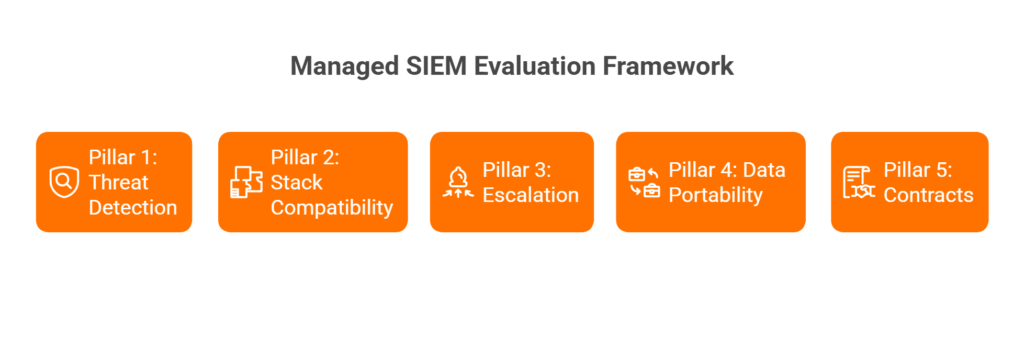
The right managed SIEM vendor isn’t the one with the best detection engine. It’s the one that can detect, verify, respond, and give you your data back when the contract ends. That’s the thesis behind this guide. We’ve built the evaluation framework around five pillars: Threat Detection, Stack Compatibility, Escalation Procedures, Data Portability, and Contract Terms. If a vendor can’t answer hard questions across all five, you’re buying a monitoring dashboard, not a managed security partner.
What This Guide Delivers
What follows are 20 vendor-evaluation questions organized across those five pillars, plus an RFP-ready checklist you can copy into your next procurement cycle. This isn’t a generic “10 questions to ask your SIEM vendor” listicle. Every question is designed for managed SIEM specifically, because the risks of outsourcing detection and response are fundamentally different from buying software.
Why This Matters Now ⏰
The urgency is real. IBM’s 2025 Cost of a Data Breach report found the average breach lifecycle has dropped to 241 days, a record low, but that number masks a harder truth: organizations that extensively employ AI and automation respond 80 days faster and save $1.9 million per breach. Gartner estimates that by the end of 2026, more than 40% of organizations, including two-thirds of midsize enterprises, will rely on managed service providers for cybersecurity operations. Rigorous vendor evaluation isn’t optional anymore. It’s the difference between buying a force multiplier and inheriting someone else’s alert queue.
Q1: What Is Managed SIEM, and How Does It Differ from Co-Managed SIEM, DIY SIEM, and MDR?
Before you start asking vendors tough questions, make sure you’re evaluating the right service model. Managed SIEM is a fully outsourced service where the provider owns the monitoring, tuning, alert triage, correlation rule management, and reporting on your SIEM platform. You don’t need a dedicated SOC team, because the vendor operates it. This is fundamentally different from buying a SIEM product (Splunk, Elastic, Microsoft Sentinel) and staffing it yourself.
The Four Models, Side by Side
| Dimension | Managed SIEM | Co-Managed SIEM | DIY SIEM | MDR |
|---|---|---|---|---|
| Ownership | Vendor operates your SIEM | Shared between you and vendor | Fully internal | Vendor provides detection + response platform |
| Control | Vendor manages rules, tuning, triage | You set policies; vendor executes | Full control | Varies, often vendor-controlled |
| Staffing Required | Minimal (1 internal liaison) | Tier 2–3 internal team | Full SOC team (Tier 1–3) | Minimal, vendor staffs analysts |
| Typical Buyer | Mid-market, lean security teams | Enterprises with partial SOC | Large enterprises, regulated industries | SMBs and mid-market without SOC |
| Cost Model | Monthly per-endpoint or per-GB | Blended (internal + outsourced) | CapEx + headcount heavy | Per-endpoint/month subscription |
When to Choose Each Model
- Managed SIEM → Team under 5 security staff, existing SIEM investment you want to preserve, compliance-driven monitoring needs.
- Co-Managed SIEM → You have Tier 2–3 analysts in-house but need Tier 1 triage offloaded and 24/7 coverage filled.
- DIY SIEM → Large enterprise with dedicated SOC, deep customization requirements, and budget for 10+ security FTEs.
- MDR → No existing SIEM, need turnkey detection and response, willing to adopt the vendor’s platform.
Where UnderDefense Fits ✅
We offer both fully managed and co-managed SIEM models on Elastic, Splunk, and other customer-owned platforms, preserving your existing investments instead of forcing a rip-and-replace. As one reviewer put it:
“At first, we hired them for managed SIEM service, but after they demonstrated the value of MDR, our management was motivated to act on it.”
— Yaroslava K., IT Project Manager UnderDefense G2 – Verified Review
The key distinction: we bring 24/7 SOC coverage with a concierge analyst model on your stack, so you retain full data ownership from day one.
Pillar 1: Threat Detection
Q2: How Does Your AI/ML Detection Engine Identify Threats That Signature-Based Rules Miss?
Every vendor claims “AI-powered detection” in 2026. The architectures differ wildly. Some vendors bolt a machine-learning layer on top of static correlation rules and call it AI. Others run behavioral analytics (UEBA) across identity, endpoint, and network telemetry to detect anomalies that signatures can’t catch, like lateral movement using legitimate credentials.
What to Ask For
- Detection logic transparency: Can the vendor show you how a detection fired, not just that it fired?
- False positive rates pre- and post-onboarding
- UEBA capabilities and behavioral baselines
- Observable, auditable workflows, no black boxes
⚠️ Red flag: “Our AI handles it” with no explainability. If you can’t audit the detection logic, you can’t trust the output.
Q3: What Percentage of the MITRE ATT&CK Framework Do Your Detections Cover, and Can You Prove It?
The wrong way to evaluate this: accepting a vendor’s self-reported coverage percentage. ATT&CK coverage claims without validation are marketing, not security.
The Right Evaluation Criteria
- Request ATT&CK Navigator heatmaps showing detection-to-technique mapping
- Ask for Caldera or Atomic Red Team test results from actual customer environments
- Verify coverage across all tactic phases, from initial access through exfiltration, not just endpoint-heavy techniques
A CISO reviewing Arctic Wolf on Gartner noted exactly this kind of gap:
“Analysts provide little context, and when asked for more information in the investigation nothing is ever provided or even communicated.”
— CISO, Manufacturing Arctic Wolf – Gartner Review
Q4: How Do You Reduce False Positives Without Sacrificing Detection Coverage?
Alert fatigue is the operational tax that kills SOC teams. The question isn’t whether a vendor can detect threats. It’s whether they can tune out the noise without creating blind spots.
Evaluation Criteria
- Custom detection tuning methodology during onboarding
- Tuning cadence (weekly? monthly? ad hoc?)
- Measurable noise reduction metrics (pre vs. post onboarding)
- User verification workflow: how does the vendor confirm if suspicious activity is legitimate?
At UnderDefense, we see 99% noise reduction through a 30-day onboarding process with custom detection engineering and ChatOps-based user verification. One customer described the experience:
“Before the guys from UD stepped in, we were getting bombarded with alerts from all our security tools. Their team cleaned up our configurations and got the noise under control within the first week.”
— Verified User, Marketing and Advertising UnderDefense G2 – Verified Review
❌ Contrast: Traditional MDR providers often lack this tuning depth. One Red Canary customer noted: “Red Canary detections could be more proactive” and “there has been some shift in the thoroughness or evidence of human analysis prior to escalation.”
Q5: Do You Perform Proactive Threat Hunting, or Only Reactive Alert Monitoring?
This question separates monitoring vendors from managed detection partners. Reactive alert monitoring means the vendor waits for rules to fire. Proactive threat hunting means analysts form hypotheses, sweep your environment for indicators of compromise, and feed findings back into detection rules.
What “Good” Looks Like ✅
- Documented hunting cadence (weekly or campaign-based sweeps)
- Hunting hypotheses tied to current threat intelligence
- Findings that improve detection rules, a feedback loop, not a one-time exercise
“Their experienced SOC engineers work closely with our team, providing continuous monitoring and threat detection. They’re always on the lookout for potential vulnerabilities and take swift action to address them.”
— Oleksii M., Mid-Market UnderDefense G2 – Verified Review
⚠️ Red flag: A vendor that says “We monitor alerts 24/7” but never mentions proactive hunting. Monitoring is table stakes. Hunting is where you get ahead of the adversary.
📊 Pillar 1 Scoring Rubric
| Question | 0 Points | 1 Point | 2 Points |
|---|---|---|---|
| Q2: AI/ML Detection | No behavioral analytics; signature-only | ML present but opaque; no explainability | Transparent UEBA + auditable detection logic |
| Q3: MITRE ATT&CK Coverage | No ATT&CK mapping provided | Self-reported coverage, no validation | Validated via Caldera/Atomic Red Team with heatmaps |
| Q4: False Positive Reduction | No tuning methodology described | Basic tuning; no measurable metrics | Custom tuning + measurable noise reduction + user verification |
| Q5: Threat Hunting | Alert monitoring only | Ad hoc hunting on request | Documented program with feedback loop into detection rules |
Score Interpretation:
✅ 6–8 = Strong detection partner
⚠️ 3–5 = Gaps exist; negotiate improvements
❌ 0–2 = Monitoring-only vendor, not a managed detection partner
Pillar 2: Stack Compatibility
Q6: Do You Integrate with Our Existing SIEM/EDR/XDR Stack, or Require Replacement?
This is the vendor lock-in question, and it’s the single most expensive mistake a buyer can make. Some managed SIEM vendors require you to adopt their proprietary platform before they’ll turn on monitoring. That means ripping out Splunk, Elastic, Sentinel, or Chronicle, tools your team already invested six figures deploying, and starting over on someone else’s data lake.
How to Spot the Trap ⚠️
❌ Red flag: “We provide our own proprietary SIEM, it’s included in the service.”
✅ Green flag: “We work with your existing Splunk/Elastic/Sentinel/Chronicle deployment and manage it for you.”
Arctic Wolf, for example, requires customers to ingest data into their proprietary platform. That’s a complete stack replacement disguised as a managed service. A Sr. Cybersecurity Engineer reviewing Arctic Wolf’s MDR noted exactly this limitation:
“Still not quite there with the remediation side of things. We receive alerts, but not necessarily a clear path to resolution. Missing integrations with key products like CyberArk. This is not an extension of our security team as was originally sold.”
— Sr. Cybersecurity Engineer, Manufacturing Arctic Wolf – Gartner Review
At UnderDefense, we integrate with customer-owned SIEM, EDR, and cloud logs instead of forcing a lock to proprietary stacks. Your investment stays yours.
Q7: How Many Log Sources and Integrations Do You Support Out-of-the-Box?
Integration count matters, but what matters more is which integrations and whether the vendor can parse custom sources. A vendor that supports 50 integrations but misses your firewall, WAF, or identity provider creates the blind spots that attackers exploit.
Evaluation Criteria
- Total integration count across EDR, SIEM, identity, cloud, SaaS, and network
- Custom parser support for proprietary or niche log sources
- API-based collection for cloud-native connectors (AWS CloudTrail, Azure Monitor, GCP Logging)
- Time-to-integration for new sources during onboarding
Expel, for instance, has earned praise for its integrations but has acknowledged gaps. One reviewer pointed out:
“I wish the integrations beyond CrowdStrike were a bit more robust and greater in number. Red Canary is perhaps too reliant on CrowdStrike and less on our other sources which are important, Cloud, Identity, Email, etc.”
— Verified User, Computer Software Red Canary – G2 Verified Review
We support 250+ integrations across EDR, SIEM, identity, cloud, SaaS, and network, and during our 30-day onboarding, we build custom parsers for anything not in the catalog.
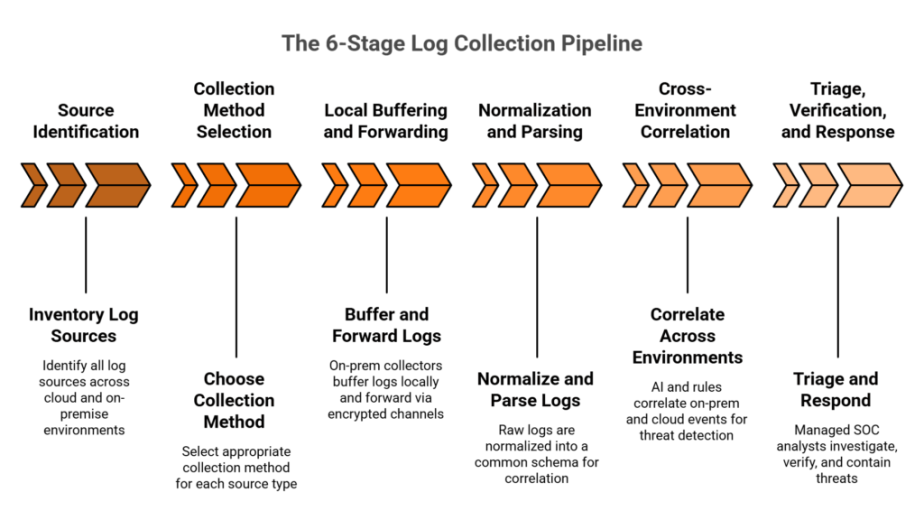
Q8: Can You Support Hybrid and Multi-Cloud Environments (AWS, Azure, GCP, On-Prem)?
Most mid-market organizations in 2026 aren’t purely cloud or purely on-prem. They’re hybrid. The managed SIEM vendor that only monitors your AWS environment but can’t see on-prem Active Directory or Azure Entra ID creates exactly the kind of blind spot attackers love.
What to Ask For
- Deployment architecture diagrams showing how telemetry flows from each environment
- Data residency options (can you keep logs in your own region or your own data lake?)
- Air-gapped or on-prem support for regulated industries (healthcare, financial services, defense)
- Support for containerized environments (Kubernetes, EKS, AKS, GKE)
Where Most Vendors Fall Short ❌
Many MDR providers are cloud-first and cloud-only. Arctic Wolf is “focused on cloud-based customers, AWS primarily, with lack of support for on-prem based technologies.” Expel “doesn’t support firewalls, WAF, GCP, SaaS, and other important logs.” If your environment spans multiple clouds plus on-prem infrastructure, verify that the vendor can see all of it, not just the easy parts.
Our UnderDefense MAXI platform can work on-prem and in customer-specific cloud environments including Azure, GCP, AWS, and Oracle, keeping your logs and AI data in your data lake.
Q9: How Do You Handle Event Storms and Data Volume Spikes Without Dropping Logs?
This question separates vendors who’ve operated at scale from vendors who haven’t. During a real incident, whether ransomware propagation, DDoS attack, or even a noisy misconfiguration, log volume can spike 10x in minutes. If your managed SIEM vendor’s ingestion pipeline can’t handle the burst, you lose visibility at the worst possible moment.
Evaluation Criteria 💰
| Factor | ❌ Red Flag | ✅ Green Flag |
|---|---|---|
| Pricing model | Per-GB with overage penalties | Per-endpoint or predictable flat-rate |
| Burst capacity | “We’ll queue and process later” | Elastic ingestion with real-time processing |
| Spike protection | No mention of volume spikes | Documented burst architecture with SLA |
| Transparency | No published pricing | Published pricing with spike provisions |
Alert Logic, for example, has a hidden volume cap that surprised customers:
“They also have a 50GB a day cap on log collection which was not brought to our attention during the whole buying phase. This has caused us to scrutinize the delivery and visibility of our logs.”
— Verified User, Health, Wellness and Fitness Alert Logic – G2 Verified Review
Ask vendors explicitly: what happens to my data during a 10x volume spike? If the answer involves “additional charges” or “processing delays,” you’ll be flying blind during the exact moments visibility matters most.
📊 Pillar 2 Scoring Rubric
| Question | 0 Points | 1 Point | 2 Points |
|---|---|---|---|
| Q6: Stack Integration | Requires proprietary replacement | Supports some existing tools, with gaps | Full vendor-agnostic integration with customer-owned stack |
| Q7: Log Source Coverage | <100 integrations; no custom parsers | 100–200 integrations; limited custom support | 250+ integrations with custom parser capability |
| Q8: Hybrid/Multi-Cloud | Cloud-only; no on-prem support | Partial coverage; gaps in specific clouds | Full hybrid + multi-cloud + on-prem + containers |
| Q9: Event Storm Handling | Per-GB pricing with caps; no burst | Burst capacity available at extra cost | Predictable pricing with elastic ingestion SLA |
Score Interpretation:
✅ 6–8 = Strong stack compatibility
⚠️ 3–5 = Integration gaps that will create blind spots
❌ 0–2 = Vendor lock-in risk; proceed with extreme caution
Pillar 3: Escalation Procedures
The 2:47 AM Scenario ⏰
It’s 2:47 AM. Your phone buzzes. The managed SIEM vendor has escalated a “Critical Alert: Suspicious PowerShell Execution on PROD-DB-01.” You open the ticket. The investigation notes say: “Suspicious activity detected. Please investigate and advise.” That’s it. No context on which user triggered the execution. No verification of whether it was a legitimate admin running a maintenance script. No containment action taken. You’re now awake, doing the investigation your vendor should have handled. I’ve watched this exact scenario play out with dozens of security leaders, and it’s the reason escalation procedures are the most under-evaluated dimension in managed SIEM vendor selection.
Q10: What Does Your Escalation Workflow Look Like from L1 Detection to Customer Notification?
What to Request
- A documented escalation flowchart showing L1 → L2 → L3 handoffs
- Clear customer notification triggers (what severity level initiates a phone call vs. email?)
- War-room initiation criteria for critical incidents
- Average handoff time between tiers
A CISO reviewing Arctic Wolf described exactly this breakdown:
“Started out well but over the years the service has consistently not met expectations. Log collectors show working, however when asked to provide logs for an investigation no logs could be provided. Analysts provide little context, and when asked for more information in the investigation nothing is ever provided or even communicated.”
— CISO, Manufacturing Arctic Wolf – Gartner Review
Q11: Do Your Analysts Verify Suspicious Activity Directly with Affected Users, or Escalate “Please Investigate” Tickets Back to My Team?
This is the question that separates managed detection from monitoring-with-extra-steps. Most behavioral alerts require human context: Did Jane Doe just log in from a new location? Did she run that PowerShell command intentionally? Was it a security-impacting configuration change, or was her account taken over?
The Scale Problem
If your organization has 50, or maybe 5,000, of these ambiguous alerts per day, can your team reach out to each affected user? Would you know if it’s the real Jane Doe or an impersonator? Most MDR vendors avoid communicating with end users entirely. They rely on assumptions or pass the investigation back to your team to sort out.
“Despite the capabilities of the technical platform and the strength of the analysts providing the service, there is still a limit to the environmental/organizational knowledge inherent in the service. This leads to a fairly frequent need for engagement with our internal team to get clarification and verification.”
— Verified User, Computer Software Expel – G2 Verified Review
At UnderDefense, we politely, but persistently, ask your users directly through Slack, Teams, email, and SMS to clarify what happened. We learn who your VIPs are, loop in managers to confirm security-impacting changes, and give special attention to alerts affecting high-value assets.
Q12: What Is Your Documented MTTR for Critical, High, Medium, and Low Severity Incidents?
Mean Time to Respond (MTTR) is the metric that reveals whether your vendor can actually act or just observe.
Evaluation Framework
| Severity | ❌ Red Flag | ✅ Green Flag |
|---|---|---|
| Critical | “We don’t publish MTTR” | ≤15 min escalation with contractual SLA |
| High | >60 min acknowledgment | ≤30 min triage with context |
| Medium | Next-business-day response | Same-day triage with recommendations |
| Low | No tracking at all | Batched in weekly summary with trending |
⚠️ If a vendor says “We monitor 24/7” but can’t produce documented MTTR per severity tier, they’re describing alert forwarding, not managed response.
A VP of Technology reviewing Arctic Wolf’s MDR put it bluntly:
“Solid detection and response capabilities, but overly relies on the client’s team for remediation, which really hurts the value of the service.”
— VP of Technology, Services Arctic Wolf – Gartner Review
Q13: Can Your Team Contain Threats (Isolate Endpoints, Revoke Credentials, Block IPs), or Only Detect and Notify?
Detection without containment is like a fire alarm that can’t call the fire department. The fastest detection in the world means nothing if the vendor has to wait for your team to take action at 3 AM.
Containment Capabilities to Verify ✅
- Blocking compromised user accounts in AD/Azure Entra
- Isolating endpoints via EDR or host-based firewall
- Blocking suspicious VPN and network traffic
- Locking cloud accounts via IAM, rotating keys, and isolating cloud resources
- Resetting user passwords and credentials
- Isolating network segments
At UnderDefense, our concierge analysts deliver a 2-minute alert-to-triage SLA with enrichment and context automation, 15-minute escalation for critical incidents, and full containment capabilities, all coordinated directly with affected users via ChatOps. The result: zero ransomware cases across all our MDR clients in six years.
“Not having to worry about ransomware, alert overload and reporting. Getting a clear view of my security posture, where the threats are coming from and how they are handled. They literally took care of all our problems.”
— Arlin O., Enterprise UnderDefense G2 – Verified Review
📊 Pillar 3 Scoring Rubric
| Question | 0 Points | 1 Point | 2 Points |
|---|---|---|---|
| Q10: Escalation Workflow | No documented workflow | Basic L1→L2 handoff; no customer triggers | Full documented flowchart with notification criteria |
| Q11: User Verification | Vendor never contacts users | Vendor contacts users on request only | Proactive ChatOps verification via Slack/Teams/Email |
| Q12: Documented MTTR | No published MTTR | MTTR published but no contractual SLA | Tiered MTTR with contractual penalties |
| Q13: Containment Authority | Detect and notify only | Partial containment (endpoint isolation only) | Full containment: endpoint, identity, network, cloud |
Score Interpretation:
✅ 6–8 = True managed response partner
⚠️ 3–5 = Alert forwarding with partial response
❌ 0–2 = You’re the SOC; they’re the dashboard
Pillar 4: Data Portability and Ownership, Questions Q14–Q17 [toc=Data Portability Pillar]
Data portability is the most under-discussed and under-negotiated dimension of any managed SIEM engagement. I’ve watched organizations discover, only at contract renewal time, that their log data, custom detection rules, and correlation logic are trapped inside a vendor’s proprietary platform. Here’s a self-assessment checklist that will surface those gaps before they become expensive surprises.
📋 Data Portability Readiness Checklist
Run through these eight items with your current managed SIEM vendor. Be honest, because every unchecked box represents a lock-in risk that compounds over time.
Q14: Log Data Ownership Is Contractually Yours
Your agreement explicitly states that all ingested log data, enriched telemetry, and historical records belong to your organization, not the vendor.
Q15: End-of-Contract Data Export Has a Defined Timeline and Format
The vendor specifies an export window (30–90 days), delivers data in open formats (JSON, CSV, Parquet), and has a documented deletion policy after handoff.
Q16: Custom Detection Rules, Correlation Logic, and Playbooks Are Exportable
If you’ve invested months tuning SIEM rules, those assets transfer with you, not vanish when the contract ends.
Q17: Data Residency Is Transparent and Configurable
You can choose where your data is stored (region, jurisdiction), and the vendor discloses all third-party sub-processors handling your telemetry.
Additional Checklist Items
- Vendor provides data in open standards (CEF, OCSF, or LEEF), not proprietary binary formats.
- No egress fees or “data extraction surcharges” apply during export.
- You retain API access to your data throughout the contract and during the exit window.
- Historical compliance evidence (audit logs, incident records) remains accessible post-termination.
📊 Score Interpretation
| Score | Assessment | What It Means |
|---|---|---|
| 6–8 ✅ | Your vendor respects data ownership | Low lock-in risk. You can migrate or renegotiate from a position of strength. |
| 3–5 ⚠️ | Portability gaps create lock-in risk | You likely own the data on paper but lack practical export mechanisms. Negotiate fixes now. |
| 0–2 ❌ | You’re trapped | Switching vendors will be painful and expensive. Start planning your exit clause renegotiation immediately. |
🔍 Red Flag / Green Flag Table
| Question | 🟢 Green Flag | 🔴 Red Flag |
|---|---|---|
| Q14: Who owns the log data? | “You own all data; we are a processor.” | “Data is stored in our proprietary lake; ownership transfers upon ingest.” |
| Q15: What happens at contract end? | “30-day export window, open format, confirmed deletion certificate.” | “Data deleted 7 days after termination. No export tooling provided.” |
| Q16: Can you export detection rules? | “All rules in Sigma/YAML format; correlation logic fully portable.” | “Rules authored in our proprietary DSL; not exportable.” |
| Q17: Where is data stored? | “You choose region. Sub-processor list published and updated quarterly.” | “Multi-region by default. Residency selection is an enterprise-tier add-on.” |
✅ How UnderDefense Closes These Gaps
This is exactly why we built our managed SIEM model the way we did. UnderDefense operates on customer-owned platforms, Elastic, Splunk, Microsoft Sentinel, meaning all detection rules, correlation logic, and historical data stay in your environment from day one. There’s no proprietary data lake. No extraction fees. No “please contact support to request your own logs.” Your SIEM deployment is yours; we provide the analysts, the AI-driven enrichment through UnderDefense MAXI, and the operational expertise on top of it.
As one experienced CISO put it during a podcast discussion about this exact architecture: the moment you separate your MDR provider from your SIEM data platform, you protect the business logic, correlation rules, and institutional knowledge you’ve invested months building. That’s not a theoretical advantage but the difference between a 30-day migration and a 6-month rebuild.
Pillar 5: Contract Terms and Pricing
Pricing opacity is one of the biggest red flags in the managed SIEM market. Enterprise SIEM solutions can range from $20–$50 per GB/day for data volume-based models, while managed services typically charge $15–$30 per endpoint monthly. Those numbers mean nothing if the vendor hides overages, auto-renewal traps, and professional services surcharges in the fine print.
💰 The Three Contract Questions You Must Ask
Q18: Is Your Pricing Published, Predictable, and Per-Endpoint, or Hidden Behind “Contact Sales” with Per-GB Overages?
Predictable pricing matters operationally. If your vendor charges per-GB and you experience a security incident that spikes log volume 10x, you could face a surprise bill that exceeds your monthly security budget. Look for per-endpoint or per-asset models with published rates.
Q19: What Are Your Contract Term Lengths, Auto-Renewal Clauses, and Early Termination Provisions?
Some vendors embed 60-day renewal notice windows instead of the standard 30 days. Miss that window, and you’re locked in for another year automatically. Demand clear early termination provisions, prorated refund schedules, and no penalty for scaling down.
Q20: What Does Onboarding Cost, and What’s Included vs. Billed as Professional Services?
Onboarding is where hidden costs multiply. If the vendor quotes $150K/year for managed SIEM but charges $40K in “professional services” for deployment, custom rule tuning, and initial configuration, that’s a 27% cost overrun you didn’t budget for.
⚠️ Managed SIEM Vendor Red Flags Checklist
Score your vendor against these ten red flags. Every checked item is a contract trap waiting to trigger.
- Auto-renewal clauses with notice windows exceeding 30 days
- No published pricing: “contact sales” is the only path to a quote
- Per-GB pricing with no cap or burst forgiveness during incidents
- Ambiguous SLA penalties: SLA breach compensation isn’t defined in dollar terms
- Data deleted at contract end with no structured export process
- Onboarding fees exceeding 20% of the annual contract value
- Proprietary tool requirements: you must replace existing EDR/SIEM to use the service
- No exit clause provisions: termination for convenience isn’t available or carries >3 months’ penalty
- Annual price escalation clauses exceeding 5% without tied service improvements
- Compliance support billed separately: SOC 2, HIPAA, and ISO 27001 evidence generation costs extra
Score Interpretation
| Red Flags Found | Assessment |
|---|---|
| 0–2 ✅ | Contract is clean. Proceed with confidence. |
| 3–5 ⚠️ | Negotiate hard on flagged items before signing. |
| 6–10 ❌ | Walk away. These terms favor the vendor, not your security program. |
✅ How UnderDefense Approaches Pricing and Contracts
We publish our pricing because transparency is non-negotiable: $11–$15/endpoint/month, with 30-day turnkey onboarding included, no separate professional services invoice. Customer owns all data and detection logic. No proprietary tool requirements. And our forever-free compliance kits mean SOC 2, ISO 27001, and HIPAA evidence generation never becomes an add-on surprise.
💸 When you compare that to the industry median, Arctic Wolf’s $96K/year median annual contract with opaque “contact sales” pricing, the contrast is stark. We want you to evaluate us on outcomes, not on how cleverly we structured the billing.
The Complete RFP-Ready Checklist: All 20 Questions in One Scorable Template
Here’s every question from this evaluation framework organized by pillar, formatted so you can copy it directly into your vendor RFP, internal evaluation worksheet, or scoring call agenda.
📋 The 20-Question Managed SIEM Evaluation Framework
Pillar 1: Threat Detection and Coverage (Q1–Q5)
- What percentage of MITRE ATT&CK techniques does your detection engine cover?
- How do you handle behavioral analytics vs. signature-based detection?
- What is your false positive rate, and how do you tune detections for each customer?
- Do you provide proactive threat hunting, or only reactive alert-based monitoring?
- How do you detect threats across cloud, identity, endpoint, and network simultaneously?
Pillar 2: Stack Compatibility and Integration (Q6–Q9)
- How many third-party security tools do you integrate with natively?
- Can you operate on our existing SIEM platform (Splunk, Elastic, Sentinel), or do you require proprietary replacement?
- How do you ingest and normalize data from custom or legacy applications?
- What happens to our existing detection rules and configurations during onboarding?
Pillar 3: Escalation and Response Workflow (Q10–Q13)
- What is your documented Mean Time to Triage and Mean Time to Respond for critical incidents?
- Do your analysts contain and remediate threats, or only detect and escalate?
- Can your team communicate directly with affected end users to verify suspicious activity?
- What does your escalation path look like: ticket-based queues or direct analyst communication?
Pillar 4: Data Portability and Ownership (Q14–Q17)
- Who owns the log data, us or you?
- What happens to our data at contract end: export timeline, format, deletion policy?
- Can we export our custom detection rules, correlation logic, and playbooks?
- Where is our data stored, and can we choose data residency?
Pillar 5: Contract Terms and Pricing (Q18–Q20)
- Is your pricing published, predictable, and per-endpoint, or hidden behind “contact sales”?
- What are your contract term lengths, auto-renewal clauses, and early termination provisions?
- What does onboarding cost, and what’s included vs. billed as professional services?
📊 Scoring Methodology
Rate each vendor on every question using this scale:
| Score | Meaning |
|---|---|
| 0 | Does not meet the requirement |
| 1 | Partially meets: gaps exist or answer is vague |
| 2 | Fully meets: specific, verifiable, documented |
Total possible: 40 points.
| Total Score | Interpretation |
|---|---|
| 32–40 ✅ | Strong managed SIEM partner. Proceed to pilot/POC. |
| 20–31 ⚠️ | Significant gaps. Negotiate improvements on weak areas before committing. |
| Below 20 ❌ | Walk away. This vendor cannot be a true security partner at this maturity level. |
🏢 Who Should Score Which Pillar
Distribute this checklist across your evaluation team to prevent any single perspective from dominating the decision:
- CISO / Security Director → Scores Pillar 1 (Detection) and Pillar 3 (Escalation)
- IT Director / Infrastructure Lead → Scores Pillar 2 (Stack Compatibility) and Pillar 4 (Data Portability)
- GRC Lead / Compliance Manager → Scores Pillar 4 (Data Ownership) and Pillar 5 (Contract Terms)
- CFO / Finance → Reviews Pillar 5 (Pricing) and validates total cost of ownership assumptions
How to Run a Final Scoring Workshop
Schedule a 90-minute session after each vendor completes your RFP. Each stakeholder presents their pillar scores with evidence. Discuss disagreements openly: a “1” from the IT Director on integration compatibility overrides a “2” from the sales deck. Final scores should reflect operational reality, not vendor promises.
UnderDefense publishes its SLAs, pricing, and capabilities because transparency is the foundation of partnership. Request a scored evaluation call where we walk through all 20 questions against our own service, because we expect you to validate before you commit.
How UnderDefense Scores Against the 20-Question Framework
Rather than asking you to take our word for it, here’s how we score on the same framework this article presents. Full transparency, applied to ourselves first.
📊 UnderDefense vs. Typical Managed SIEM Provider
| Pillar | Criteria | UnderDefense | Typical Managed SIEM Provider |
|---|---|---|---|
| Detection | MITRE ATT&CK coverage | ✅ 96% documented coverage | ⚠️ Often claimed, rarely published |
| Detection | Proactive threat hunting | ✅ 24/7 AI + human hunting | ❌ Reactive alerting only |
| Detection | False positive tuning | ✅ 99% alert noise reduction in first month | ⚠️ Generic rules, limited customization |
| Integration | Tool compatibility | ✅ 250+ integrations, vendor-agnostic | ❌ Proprietary stack required |
| Integration | Existing SIEM preservation | ✅ Operates on your Splunk, Elastic, or Sentinel | ❌ Requires SIEM replacement |
| Escalation | Response SLA | ✅ 2-min alert-to-triage, 15-min critical escalation | ⚠️ Not published or vaguely defined |
| Escalation | Containment and remediation | ✅ Full response: credential revocation, endpoint isolation | ❌ Detect and escalate only |
| Escalation | User verification (ChatOps) | ✅ Direct Slack/Teams/email contact with affected users | ❌ Not available |
| Data | Log data ownership | ✅ Customer owns all data | ⚠️ Vendor-controlled data lake |
| Data | Detection rule portability | ✅ All rules stay in customer-owned SIEM | ❌ Proprietary, non-exportable |
| Contract | Published pricing | ✅ $11–$15/endpoint/month | ❌ “Contact sales” |
| Contract | Onboarding | ✅ 30-day turnkey, included | ⚠️ 60–90 days, billed separately |
| Contract | Compliance support | ✅ Forever-free compliance kits (SOC 2, ISO 27001, HIPAA) | ❌ Separate product/cost |
🔑 Key Differentiators Worth Highlighting
ChatOps User Verification is the capability no competitor offers at scale. When UnderDefense MAXI flags a suspicious login or OAuth grant, our analysts don’t open a ticket and wait. They message the affected user directly via Slack, Teams, or email to confirm or deny the activity. This closes alerts that traditional MDR providers simply cannot resolve without escalating back to your team.
Concierge Analyst Model means you get dedicated Tier 3–4 analysts who learn your environment, your org chart, and your risk tolerance. This isn’t a rotating queue of anonymous L1 analysts reading playbooks but practitioners who know your business context.
Vendor-Agnostic Integration preserves every dollar you’ve already invested in CrowdStrike, SentinelOne, Splunk, Microsoft Defender, Okta, and 250+ other tools. We enhance your existing stack. We never require you to replace it.
⏰ Choose UnderDefense If…
Choose UnderDefense if you want to protect existing security investments, need transparent and predictable pricing, and want analysts who verify alerts directly with users rather than escalating “please investigate” tickets back to your overwhelmed team. If you’re starting from scratch with zero existing tools and prefer a single-vendor ecosystem with no integration concerns, a proprietary-stack provider may work. But if you’ve already invested in security tools and want a partner who makes those investments operationally effective, that’s exactly what we built MAXI to do.
📈 Social Proof
100% ransomware prevention record across 500+ MDR clients over six years. 830% ROI over three years. Detected threats 2 days faster than CrowdStrike OverWatch in documented case studies.
“UnderDefense MAXI integrates well with our systems, specifically with our SIEM, Splunk. Their team is proactive in identifying and addressing threats, providing 24/7 oversight. With UnderDefense MAXI, we’ve reduced security breaches. Their adherence to SLAs gives me confidence in our infrastructure’s protection.”
— Oleg K., Director Information Security UnderDefense G2 – Verified Review
“Their expert management of our SIEM has added to the value of our security investments and tools. They are proactive, suggesting relevant and cost-effective security improvements and new use cases that enhance our defenses.”
— Yaroslava K., IT Project Manager UnderDefense G2 – Verified Review
1. What are the most important questions to ask when evaluating a managed SIEM vendor?
We recommend structuring your evaluation around five pillars: threat detection, stack compatibility, escalation procedures, data portability, and contract terms. Within each pillar, specific questions reveal whether a vendor can truly operate as an extension of your security team or simply forwards alerts back to you.
Key questions include:
-
What percentage of MITRE ATT&CK techniques do your detections cover, and can you prove it with validated heatmaps?
-
Do you integrate with our existing SIEM/EDR/XDR stack, or require proprietary replacement?
-
What is your documented Mean Time to Triage and Mean Time to Respond for critical incidents?
-
Who owns the log data, and what happens to it at contract end?
-
Is your pricing published, predictable, and per-endpoint?
We built our managed SIEM service specifically to answer these questions transparently. The full 20-question framework in our guide includes a scoring rubric (0–2 per question, 40 points total) so your evaluation team can score vendors objectively rather than relying on sales presentations.
2. How do I avoid vendor lock-in when choosing a managed SIEM provider?
Vendor lock-in is the single most expensive mistake in managed SIEM procurement, and it typically manifests in three ways: proprietary platform requirements, non-exportable detection rules, and data held hostage at contract end.
To avoid it, we recommend verifying:
-
The vendor operates on your existing SIEM platform (Splunk, Elastic, Microsoft Sentinel) rather than requiring migration to a proprietary data lake.
-
Custom detection rules, correlation logic, and playbooks are authored in portable formats (Sigma/YAML) and exportable at any time.
-
Your contract explicitly states log data ownership, with a defined export window (30–90 days) in open formats (JSON, CSV, Parquet).
-
No egress fees or “data extraction surcharges” apply during export.
At UnderDefense, we operate on customer-owned platforms, which means all detection rules, correlation logic, and historical data stay in your environment from day one. There is no proprietary data lake, and your SIEM deployment remains yours regardless of contract status.
3. What is a good MTTR benchmark for managed SIEM providers in 2026?
Mean Time to Respond (MTTR) varies by severity tier, and any vendor that quotes a single blanket number is oversimplifying. We recommend evaluating two distinct SLAs: alert-to-triage time and escalation time for critical incidents.
Strong benchmarks by severity tier:
-
Critical: 15-minute or faster escalation with a contractual SLA.
-
High: 30-minute triage with enriched context provided to your team.
-
Medium: Same-day triage with documented recommendations.
-
Low: Batched in weekly summaries with trending analysis.
If a vendor claims “24/7 monitoring” but cannot produce documented MTTR per severity tier, they are describing alert forwarding, not managed response. Our concierge analysts deliver a 2-minute alert-to-triage SLA with enrichment and context automation, plus 15-minute escalation for critical incidents. You can review how we define and measure SOC performance metrics in detail, including MTTD, MTTA&A, and MTTR, to ensure you are comparing vendors on the same terms.
4. What red flags should I watch for in a managed SIEM vendor contract?
Contract red flags are often buried in fine print and only surface at renewal or termination. We have identified ten specific traps that security leaders should screen for before signing:
-
Auto-renewal clauses with notice windows exceeding 30 days.
-
No published pricing, where “contact sales” is the only path to a quote.
-
Per-GB pricing with no cap or burst forgiveness during security incidents.
-
Data deleted at contract end with no structured export process.
-
Onboarding fees exceeding 20% of the annual contract value.
-
Proprietary tool requirements that force you to replace existing EDR/SIEM.
We publish our managed SIEM pricing openly: $11–$15/endpoint/month, with 30-day turnkey onboarding included and no separate professional services invoice. Transparency is non-negotiable because hidden costs erode the trust a security partnership depends on.
5. How many integrations should a managed SIEM vendor support, and why does it matter?
Integration count matters, but which integrations and whether the vendor can parse custom sources matters more. A vendor that supports 50 integrations but misses your firewall, WAF, or identity provider creates blind spots that attackers exploit.
We recommend evaluating:
-
Total integration count across EDR, SIEM, identity, cloud, SaaS, and network categories.
-
Custom parser support for proprietary or niche log sources your organization uses.
-
API-based collection for cloud-native connectors (AWS CloudTrail, Azure Monitor, GCP Logging).
-
Time-to-integration for new sources during onboarding.
Our UnderDefense MAXI platform supports 250+ integrations out of the box, and during our 30-day onboarding, we build custom parsers for anything not already in the catalog. The goal is zero blind spots across your environment, not just a high number on a marketing page.
6. Should I choose managed SIEM or MDR for my organization?
The choice depends on whether you have an existing SIEM investment you want to preserve. Managed SIEM is ideal for organizations with an existing platform (Splunk, Elastic, or Sentinel) and a lean security team that needs the vendor to operate monitoring, tuning, alert triage, and correlation rule management. MDR is better suited for organizations starting from scratch that are willing to adopt the vendor’s detection and response platform.
Key differences:
-
Managed SIEM preserves your existing tooling and data ownership. The vendor operates your SIEM.
-
MDR typically provides a turnkey platform. The vendor owns the detection stack.
-
Co-managed SIEM splits responsibilities, where you set policies and the vendor executes.
We offer both fully managed and co-managed SIEM models on customer-owned platforms. You can explore the detailed comparison of MDR vs. managed SIEM vs. co-managed SIEM in our service documentation. The key distinction: with our model, you retain full data ownership and detection rule portability from day one.
7. How do I create an RFP for managed SIEM vendor evaluation?
A strong managed SIEM RFP should be structured around five evaluation pillars, with specific, scorable questions under each. We recommend using a 20-question framework that covers threat detection (Q1–Q5), stack compatibility (Q6–Q9), escalation procedures (Q10–Q13), data portability (Q14–Q17), and contract terms (Q18–Q20).
For each question, score vendors on a 0–2 scale:
-
0: Does not meet the requirement.
-
1: Partially meets, with gaps or vague answers.
-
2: Fully meets, with specific, verifiable, documented evidence.
Distribute scoring across stakeholders: CISO scores detection and escalation, IT Director scores stack compatibility and data portability, GRC Lead scores data ownership and contract terms, and CFO validates total cost of ownership. Schedule a 90-minute scoring workshop after each vendor completes the RFP to compare results. You can download our complete SOC provider evaluation checklist as a starting template and customize it with the 20 questions from this guide.
8. Can a managed SIEM vendor support hybrid and multi-cloud environments?
Most mid-market organizations in 2026 operate hybrid environments spanning AWS, Azure, GCP, and on-prem infrastructure. A managed SIEM vendor that only monitors your cloud environment but cannot see on-prem Active Directory or Azure Entra ID creates exactly the kind of blind spot attackers exploit.
When evaluating multi-cloud support, request:
-
Deployment architecture diagrams showing how telemetry flows from each environment.
-
Data residency options, including whether you can keep logs in your own region or data lake.
-
Air-gapped or on-prem support for regulated industries (healthcare, financial services, defense).
-
Support for containerized environments (Kubernetes, EKS, AKS, GKE).
Our UnderDefense MAXI platform works on-prem and in customer-specific cloud environments including Azure, GCP, AWS, and Oracle, keeping your logs and AI data in your data lake. You can also explore our dedicated cloud security managed services for environment-specific deployment details.
The post Evaluate Managed SIEM Providers: 20 RFP Questions That Expose Vendor Gaps appeared first on UnderDefense.